
Participating Frequently
December 16, 2018
Question

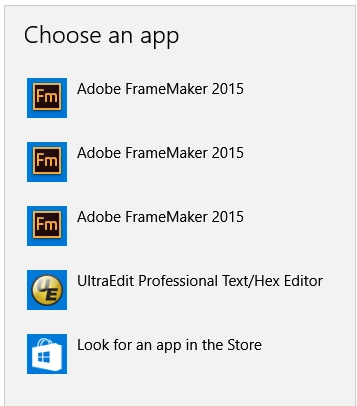
Why is FM2017 and FM2019 show themselves as FM2015 in Windows 10

  • December 16, 2018
  • 2 replies
  • 624 views

I'm evaluating multiple versions of FM.

When I want to assign an app to a file type (e.g. .fm), Windows will show me all 3 version of installed FM for file type .fm but display the same app name.

This is very confusing to say the least...

Since I couldn't find a place to specify a bug, I've used this forum.

Below is a screenshot for showing how Windows 10 RS3 displays FM2015, FM2017, FM2019 (x64) when I request to change the default for file type .fm.
    This topic has been closed for replies.

    2 replies

    Legend
    December 16, 2018

    In which order did you install the versions? Was Fm 2015 the last one?

    On my machine (Windows 10, 1809) it works as expected:

    Eric_GurAuthor
    Participating Frequently
    December 16, 2018

    2015 first, then 2017 and 2019 last

    Legend
    December 16, 2018

    Hm. Looks like something got mixed up there, somehow.

    Please try the following: Go to the FrameMaker 2015 installation directory, make a right-mouseclick on the FrameMaker.exe and select "Run as administrator". Let FM start and then close it. Repeat the same for 2017, and 2019 versions. Reboot Windows.

    (Running FM as admin this way, reregisters FrameMaker in Windows. My hunch is, this should fix the problem.)

    Allow me to assume, that you are a little bit more tech savvy … if so, you can also check the windows registry (run regedit) and look at the entries for the FM documents. E.g. for FrameMaker 2019 (internal FM 15.x.x.xxx):

    Hezy A
    Inspiring
    December 16, 2018

    You can report bugs at the top of the community page

    under the Adobe Tracker

    Adobe FrameMaker

    Tracker

    Eric_GurAuthor
    Participating Frequently
    December 16, 2018

    I will open a bug, thanks!