


Participant
April 9, 2015
Question

Why is FrameMaker 12 giving error message "FrameMaker has encountered a serious error?"

  • April 9, 2015
  • 2 replies
  • 535 views

Hi All,

I have a couple people that are experiencing the exact same thing.  They are all using FrameMaker 12 Structured mode, and when they are trying to open up certain files, this is what they experience.
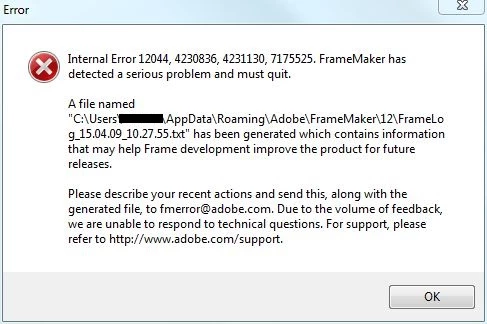
I have un-installed and re-installed the software and still no luck.  I have already sent an email to fmerror@adobe.com, but I was just going to post on the forum to see if anyone else has ever had this happen to them.  They can also open up some files, but the one's that they are needing to open up aren't working.  Any help is appreciated.

    This topic has been closed for replies.

    2 replies

    Inspiring
    April 13, 2015

    Hi,

    Can you please share your FM files that are crashing so that we can have a look and identify what's going wrong. Also attach the crash logs here so that we can debug the issue.

    Thanks,

    Anchal Arora

    Framemaker Engineering

    Arnis Gubins
    Inspiring
    April 9, 2015

    It sounds like the files may be corrupt if FM is stable when opening other files. Test to see if the same file crashes FM on different machines. Hopefully, you have a back-up version of those files.

    Sending the logs to fmerror is a one-way street. You won't get a response as this is just a reporting mechanism.

    Participant
    April 9, 2015

    That's what I was guessing.  I have had them test on multiple machines and still crashing and giving the internal errors. 

    Arnis Gubins
    Inspiring
    April 9, 2015

    That pretty much points the finger at the file(s) as being somehow corrupt. If you can just open the file and it doesn't crash before working on it, then you should immediately try saving as MIF. If this works, then opening the MIF and re-saving as the binary .fm might just clean out the corruption.

    As a last resort, you could try using FM's Heroic Open.

    1. Open/create a blank FM document (File > New > Document).

    2. Use the <esc> o H  shortcut ( it's the lowercase "O") - press the keys in sequence, not simultaneously.

    3. Select the bad file from the browser and keep your fingers crossed.