K.Daube
Community Expert
Community Expert
February 10, 2021
Question

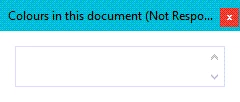
Why is my listbox empty?

  • February 10, 2021
  • 2 replies
  • 361 views

Dear all,

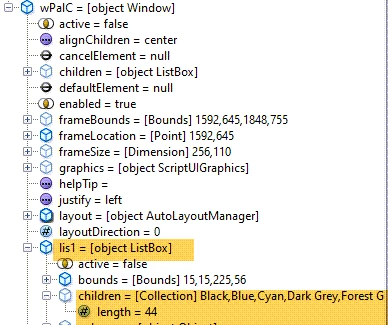
It looks that simple, the array is filled, the list box has its items - but the display is empty:

Status of script at breakpoint:
KLD_Z.main = function () { 
var asColours = [], oDoc, wPalC;
  oDoc = app.ActiveDoc;
  wPalC = new Window("palette", "Colours in this document");  
  wPalC.lis1 = wPalC.add ("listbox", undefined, undefined);
  wPalC.lis1.preferredSize.width = 210; 
  KLD_Z.GetColourNameList(oDoc, asColours);    // OK
  KLD_Z.FillDlgList (wPalC.lis1, asColours);   // OK
  wPalC.show();                                // NOK
$.bp(true);
} //--- end main -----------------------------------------

I have not the slightest idea what's wrong here.

This topic has been closed for replies.

2 replies

Ian Proudfoot
Legend
February 10, 2021

Hi Klaus,

This is a long-standing ScriptUI bug. The only known work-around is to put the list box inside a Group or Panel containter.

The same bug afflicts the Tree View object too.

Ian

K.Daube
Community Expert
K.DaubeCommunity ExpertAuthor
Community Expert
February 10, 2021

Thanks, Ian, to remind me...

Wherever it worked for me - and therefore I was so puzzled - actually is within a group together with a label at left (statictext) ...

Klaus Göbel
Legend
February 10, 2021

Hi Klaus,

how does

KLD_Z.FillDlgList (wPalC.lis1, asColours);

look like?


For tests just change

wPalC.lis1 = wPalC.add ("listbox", undefined, undefined);

to

wPalC.lis1 = wPalC.add ("listbox", undefined, [""]);