

Cagataytech
Known Participant
January 25, 2021
Answered

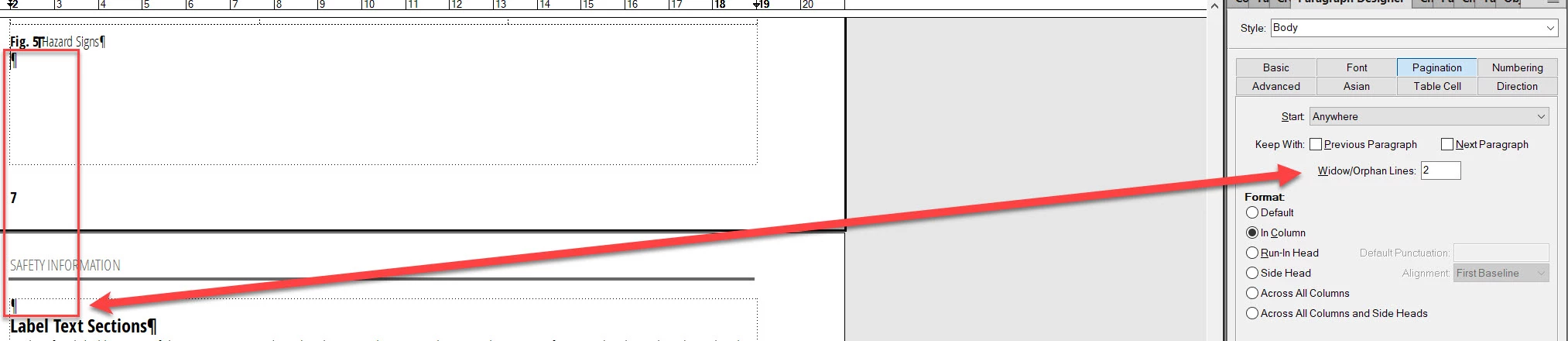
"Widow/Orphan Line" box doesn't accept "zero" as a value

  • January 25, 2021
  • 1 reply
  • 1774 views

This is a newbie question. My Framemaker version is 2020. Whenever I insert a page break at the end of my pages the next page always starts with an empty line. When I try deleting that empty line by backspacing then the page break gets removed and the next section gets merged into the former page. I did some research in the community and my impression was that I needed to let zero "Widow/Orphan Lines" to be created for pagination. The strange thing is that whenever I enter "0" into this box and press Enter (or update my style) then the value does automatically change to "1" and all of my page breaks get invalidated and removed. I also select "Remove Overrides" when Framemaker warns me about some paragraphs using format overrides during the paragraph style update process. I'm not breaking the pages at tables or graphics. I'm simply ending sections or sub-sections and continuing to another section or sub-section on the next page. I always end these sections/sub-sections in the "Body" paragraph style to acquire a clear "page break" definition.


Maybe my entire page layout has some basic formatting problems but I couldn't find any clues by checking them which could cause this behaviour.
 

This topic has been closed for replies.
Correct answer Winfried Reng

PageBreak markers are only relevant for the conversion to HTML5. They do not change the pagination in FrameMaker.

I usually change the pagination in the Page Break pod, when this is needed.

You could also create a separate paragraph format "PageBreak" which would be empty and e.g. only 2 pt. Or regular size and Run-In Head. With this paragraph you could always set the pagination whereever you want. And you can search for these page breaks. But you cannot remove these page breaks by importing paragraph formats into this document.

1 reply

frameexpert
Community Expert
Community Expert
January 25, 2021

Widow/Orphan Lines means how many lines can be by themselves when a paragraph breaks across columns or pages. That is why the smallest value accepted is 1. If you always wanted all lines of a paragraph to be on the same page (or in the same column), you would use a high number like 99.


It looks like you are using blank paragraphs to control your pagination. This is not necessary if you have your section or sub-section paragraph formats set to Start: Top of Next Page. Then you won't need any blank "space" paragraphs.

Cagataytech
Known Participant
January 25, 2021

I can define specific rules for H1 and H2 styles because they always start at the top of a page but H3 is a whole different story for us. An H2 section may contain many H3 sub-sections and some may be laid out on several continuous pages whereas we may want to start some of them at the top of the page. There are many reasons for this: We may want to contain a specific set of H3 sub-sections as their own group or the H3 sub-section may be starting with some graphics or tables which would need to be set at the top of a page to fit them into a single page etc.


I've just found a page from Adobe help which talks about this exact same issue: Pagination, topic naming, and context-sensitive Help 


It's back from 2012 and talks about "Using FrameMaker with RoboHelp" but some the titles on the page make me think that I may need to utilize page break markers instead of using pagination settings for my H3 styles.


Considerations for pagination and topic titles
...
Lack of topic-level controls
Because the pagination settings are set at the project level, you cannot exercise discrete control over topics that are not in the defined heading levels. For example, suppose you want to make an H3 level topic a separate Help topic. If you set pagination at H2 for your project, you can’t do so. The H3 topic is included under the topic immediately above it.
...
Advantages of setting pagination from within FrameMaker
...
Optionally, define the titles of the topic
This option becomes useful when you want to combine many topics and assign a relevant title to the combined topic, rather than derive the topic title text from one of the heading styles.
...
Pagination options
...
Create separate HTML topics based on FrameMaker paragraph formats
You specify the heading styles in FrameMaker that should be used as the page break. For example, if the FrameMaker file contains ten topics, each with subtopics, tasks, and tables, you can have each topic convert into a separate HTML file. If each of these topic headings is at Heading 1 format, you can set each Heading 1 topic to be created as a separate HTML topic. On the other hand, if you set the pagination at Heading 2, separate HTML files are created for each Heading 2 topic,

Define Page Break markers in FrameMaker content
You can insert Page Break markers at the beginning of the paragraph in FrameMaker documents. Typically, you create page breaks at the heading levels that you choose. If you use this option, avoid defining pagination setting based on paragraph formats.


Should I go the "Page Break" marker way or do more customizable settings exist which would let me utilize paragraph styles which could both "start at the top of the page" and "continue the paragraph flow" whenever required?

Winfried RengCommunity ExpertCorrect answer
Community Expert
January 25, 2021

PageBreak markers are only relevant for the conversion to HTML5. They do not change the pagination in FrameMaker.

I usually change the pagination in the Page Break pod, when this is needed.

You could also create a separate paragraph format "PageBreak" which would be empty and e.g. only 2 pt. Or regular size and Run-In Head. With this paragraph you could always set the pagination whereever you want. And you can search for these page breaks. But you cannot remove these page breaks by importing paragraph formats into this document.