
carolinek76276267
Participating Frequently
July 12, 2018
Answered

Will Adobe FrameMaker ever have a feature that allows users to apply a Change bar beside the whole table?

  • July 12, 2018
  • 1 reply
  • 1157 views

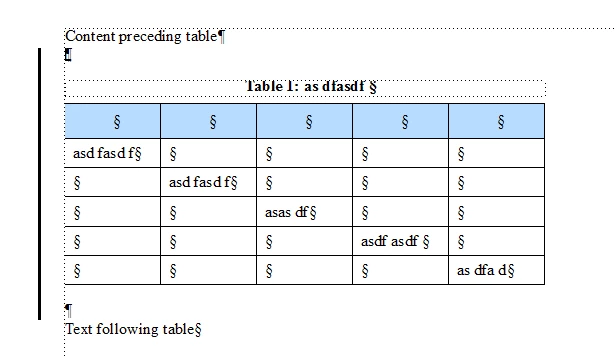
I have been searching this one again and still can't find if there's a solution: Has FrameMaker ever figured out how to allow users to apply a change bar beside the whole table? For example, when the change is the insert of a whole new table, the only way I can indicate this is to draw a line beside the table. Because selecting the content in the table and then applying Change Bar through Paragraph Designer only shows the Change Bar row-by-row (from which a reader might infer that the table was there before and all content changed in it, when what I want readers to know immediately is that the change is addition of a new table), not one single line beside the whole table. Can Adobe FrameMaker not put a Change Bar radio button/checkbox in Table Designer to allow for the placement of a Change Bar beside the whole table?

This is in unstructured FrameMaker. If this is possible in structured FrameMaker, that would be good to know...and perhaps the same functionality could be ported back to unstructured FM.

Correct answer Matt-Tech Comm Tools

Place the table in its own paragraph, place a blank paragraph below it, and you should be able to easily apply a change bar to those two paragraphs, effectively applying the change bar to the table.

You can modify the size of the font in the marker paragraph and following paragraph to minimize the total height of the line.

1 reply

Matt-Tech Comm Tools
Community Expert
Matt-Tech Comm ToolsCommunity ExpertCorrect answer
Community Expert
July 12, 2018

Place the table in its own paragraph, place a blank paragraph below it, and you should be able to easily apply a change bar to those two paragraphs, effectively applying the change bar to the table.

You can modify the size of the font in the marker paragraph and following paragraph to minimize the total height of the line.

-Matt Sullivan, FrameMaker Course Creator, Author, Trainer, Consultant
carolinek76276267
Participating Frequently
July 12, 2018

Thank you so much! That was so ridiculously easy, I hope I don't lose my FrameMaker pass for not figuring that out!

Matt-Tech Comm Tools
Community Expert
Community Expert
July 12, 2018

Don't be too hard on yourself...I think you should be able to mark one or more rows adequately with a change bar without having to use a workaround.

At least this workaround isn't too tough! I'm sure you'll get a few more suggestions as well.

-Matt

-Matt Sullivan, FrameMaker Course Creator, Author, Trainer, Consultant