


Inspiring
April 22, 2025
Answered

Window Layout

  • April 22, 2025
  • 2 replies
  • 889 views

Somehow, I changed the display of my FrameMaker window.


The file list on the left is correctly placed.


The content window, though, is expanded across the rest of the window, and the catalog panels are floating on top of the content. I want the content to be expanded only as much as it is magnified, with the scroll bar at the right edge. Right now, the scroll bar is at the far right of the window. I hope I've explained this right. Just in case, I've included a screen shot.
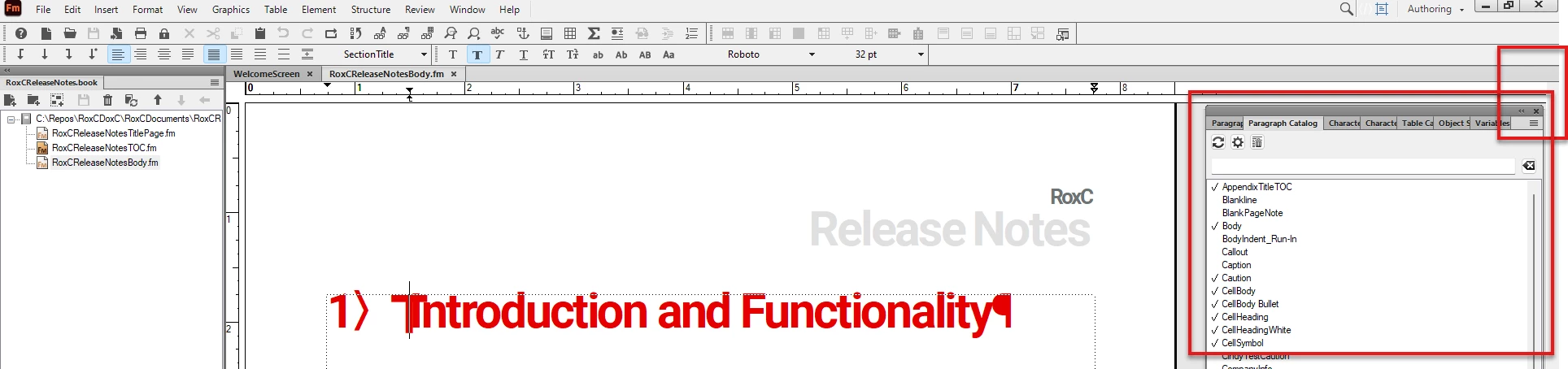
 

Can you point me to the section of the help that tells me how to properly magnify or set up the window?

 

    Correct answer Matt-Tech Comm Tools

    Hi Cindy,

    It sounds like you would like your Panel Group to be anchored on the right edge of your Fm window...

    If that's the case, take the dark grey bar and drag it to the edge til you see a vertical blue bar where you'd like the group to reside. If that isn't working for you, take the tab for the Catalog or other panel and drag to that desired position. Here's a video I created and added to my online FrameMaker course at courses.techcommtools.com

    https://www.youtube.com/watch?v=OsXWyxKZwCg


    2 replies

    Matt-Tech Comm Tools
    Community Expert
    Matt-Tech Comm ToolsCommunity ExpertCorrect answer
    Community Expert
    April 22, 2025

    Hi Cindy,

    It sounds like you would like your Panel Group to be anchored on the right edge of your Fm window...

    If that's the case, take the dark grey bar and drag it to the edge til you see a vertical blue bar where you'd like the group to reside. If that isn't working for you, take the tab for the Catalog or other panel and drag to that desired position. Here's a video I created and added to my online FrameMaker course at courses.techcommtools.com

    https://www.youtube.com/watch?v=OsXWyxKZwCg


    -Matt Sullivan, FrameMaker Course Creator, Author, Trainer, Consultant
    Inspiring
    April 22, 2025

    Thank you, Matt! Using your instructions and the video, I fixed it! Yay!


    Matt-Tech Comm Tools
    Community Expert
    Community Expert
    April 22, 2025

    Awesome! Now save that workspace as I showed, and next time you can just hit Reset Workspace and it all jumps back into place.


    -Matt Sullivan, FrameMaker Course Creator, Author, Trainer, Consultant
    Jeff_Coatsworth
    Community Expert
    Community Expert
    April 22, 2025

    If everything was looking fine before, why not just reset the workspace you were in back to its default point?

    Inspiring
    April 22, 2025

    That sounds like a great option; I will look up how!

    Thanks!