
Wrong bookmarks when saving PDF through a script
Hello,
I am in the process of creating a script to automatize exporting applications with variants (contitional text + variables) to pdf.
I have tried to use 2 different methods but they both lead to wrong bookmarks, as shown below, screenshot from Acrobat Reader:
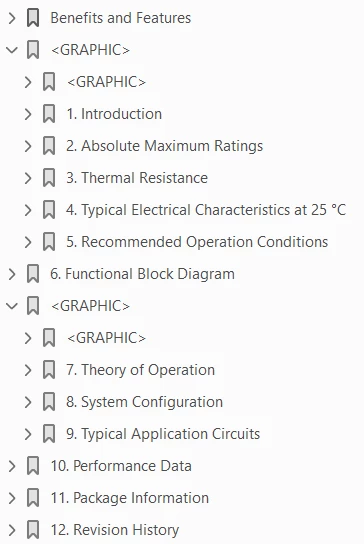
<GRAPHIC> shouldn't appear here, but somehow it does.
I have tried changing the book and documents settings using menu "format > document > pdf setup" but nothing seems to have an effet.
Those are the methods:
- Method 1:
params = GetSaveDefaultParams ();
returnParams = new PropVals ();

params[GetPropIndex (params, Constants.FS_FileType)].propVal.ival = Constants.FV_SaveFmtPdf;
params[GetPropIndex (params, Constants.FS_PDFUseDistiller)].propVal.ival = 1;

FA_errno = 0;
book.BookIsSelected = 1;
book.Save(projectBasePath + pdfNamePrefix + tag + startDate + pdfNameSuffix, params, returnParams);
- Method 2:
CallClient("FMPublisher", "SetOutputLocation " + projectBasePath + pdfNamePrefix + tag + startDate + pdfNameSuffix);
CallClient("FMPublisher", "MCPPublish PDF");
Both methods lead to the result above.
However when I manually export the pdf by selecting the book and use manu "file > save as pdf...", the bookmark show as expected:

Those are the "format > documents > pdf setup" settings that work fine when doing the export to pdf manually:
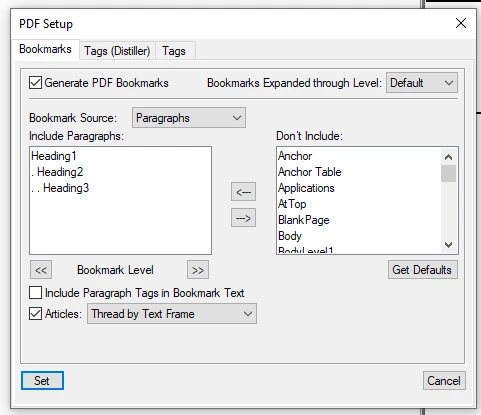
Where can I configure the bookmarks for it being taken into account when exporting with a script ?
Thanks in advance.
Best regards
Eric


 AdChoices