


Participant
Jan 4, 2019 12:12 PM UTC
Answered

Wrong indentation of Tabstop in ToC - FrameMaker 15

Hello,

I have generated TOC for my manual in FrameMaker 2015.  I formatted the TOC paragraph styles as per our style guide.

Added a tab stop as displayed.
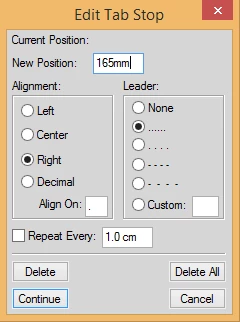
In the TOC paragraph style, when I select the tab stop and apply to TOC as displayed below:
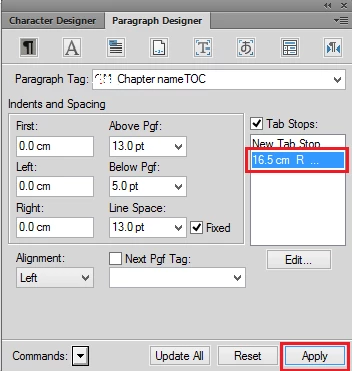
I am facing an issue in adding a Tab stop to the TOC paragraph styles. When I select the Tab stop and Click Apply. The indentation is as displayed below:
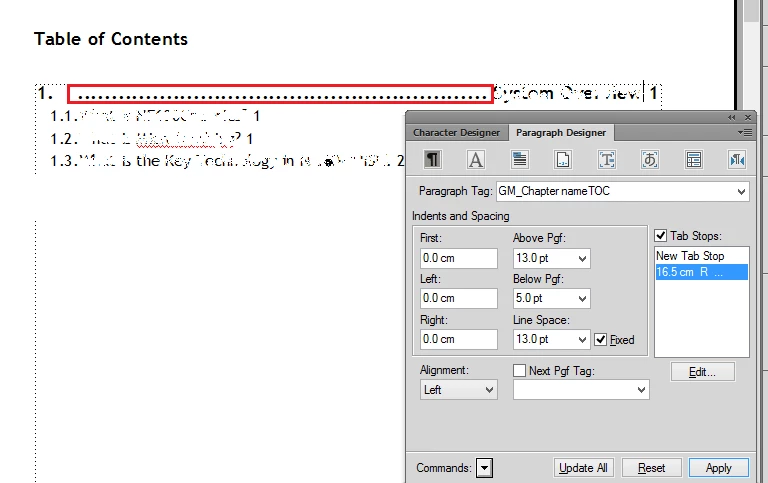
Please let me know the reason for this indentation.

Regards,

Manasi.

    This topic is closed to new replies. Start a new post to keep the conversation going.
    Ian Proudfoot
    Ian ProudfootCorrect answer
    Legend
    Jan 4, 2019 12:36 PM UTC

    Hello Manasi,

    You need to add another tab stop to handle the tab character between the paragraph number and the chapter title text. If you add (for example) a 15mm left aligned tab stop everything will align as you require. The exact position of the additional tab stop is up to you of course.

    Ian

    1 reply

    Ian Proudfoot
    Ian ProudfootCorrect answer
    Legend
    Jan 4, 2019 12:36 PM UTC

    Hello Manasi,

    You need to add another tab stop to handle the tab character between the paragraph number and the chapter title text. If you add (for example) a 15mm left aligned tab stop everything will align as you require. The exact position of the additional tab stop is up to you of course.

    Ian

    Translate