

lowflow
Known Participant
April 11, 2017
Question

wrong numbering in table of content

  • April 11, 2017
  • 2 replies
  • 496 views

hi,

the numbering of the tiles in the book is correct but while genarating out of the book a table of content the numbering of the tiles fail.

every title_1 has the number 1 title_2 and 3 work perfectly.
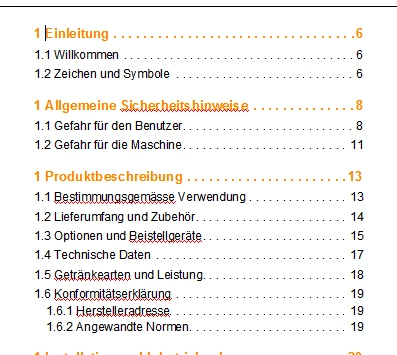
in the template

title_1TOC has T:< =0>< =0>< >

title_2TOC has T:.<n+>< =0>< >

title_3TOC has T:.<n>.<n+>< >

the TOC in the referecepage looks like following
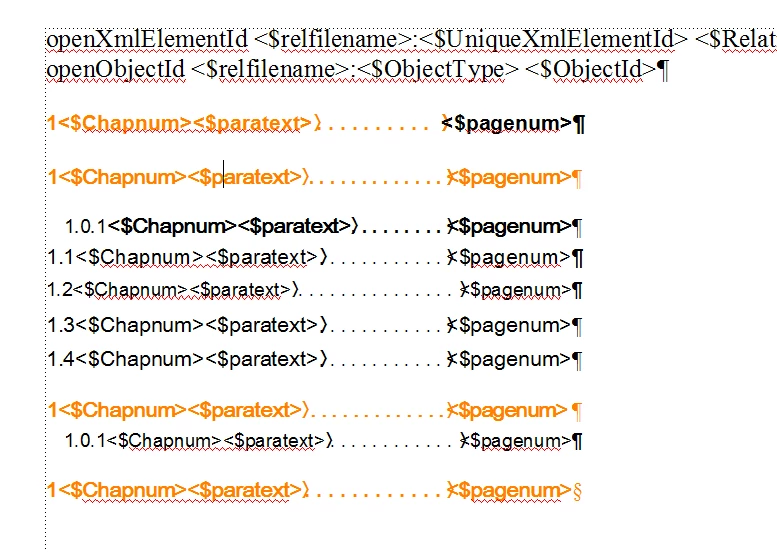
what is wrong, what do i need to change?

thanks and best regards

beat

This topic has been closed for replies.

2 replies

lowflow
lowflowAuthor
Known Participant
April 18, 2017

Dear Russ

thanks for your feedback.

The numbering you see in front of the referenspage TOC ist NOT manauly entered! it's dyseplaed because of the entery in the paragraph numbering field.

The numbering in the books TOC works quite well exept ot the 1 in front, we already treyed T: and <$chapnum> but

I did not try <$paranum> yet.

beat

Legend
April 12, 2017

Hi beat,

It has been a long time since I worked on a reference page, but I think you may have a fundamental misunderstanding of how the numbering works. I don't think that a TOC can do any type of autonumbering. When you put the "1" in the reference page entry, it is interpreted as static text and naturally will not change.

I believe all numbering should come from the target paragraphs using the building blocks like <$paranum>. Somebody can correct me if I am wrong.

Russ

lowflow
lowflowAuthor
Known Participant
April 24, 2017

Dear Russ,

thanks for your feedback, it helped a lot!

so for the TOC there is no paragraph numbering to inclued! it's all coming from the TOC of the Templates reference page and looks like this:

<$paranum> <$paratext>.......<$pagenum>

Thanks a lot!

best regards

beat

DLindsay
Inspiring
May 1, 2017

Hi beat,

I have a similar numbering system in my TOC styles as I struggled to figure out chapter numbers and paragraph numbers.

In my setup:

TOC1: <n+>\t

TOC2: <n>.<n+>\t

TOC3: <n>.<n>.<n+>\t

This may not be the best approach (I'm still a framemaker newbie) but it does work.

Hope that helps,

Kat