
Inspiring
November 18, 2024
Answered

XLIFF-Export is crashing FM 17.0.5

  • November 18, 2024
  • 1 reply
  • 1248 views

Dear community,

after updating FM to 17.0.5, it's not possible for me to export a book to XLIFF. I tried different approaches with large/small/real/test books. Each approach ends in the following error message:
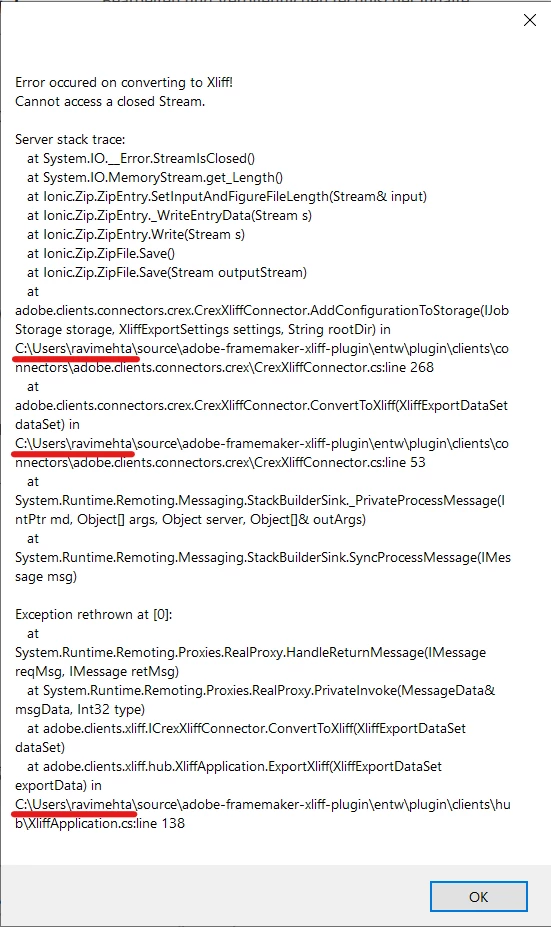
I'm surprised that the error message shows that the exceptions are thrown in files under C:\users\ravimetha\source\adobe-framemaker-xliff-plugin\entw\plugin\clients\… (see screenshot above)

This user and/or files don't exist on my environment.

My environment:

  • WIN10 Enterprise Version 22H2 (Build 19045.5011)
  • FM 17.0.5

Are there any known issues in the XLIFF-Export? Or are there any known workarounds to export a book to XLIFF?


Thanks alot for your help/tips/recommendations.

Andreas

This topic has been closed for replies.
Correct answer andreas_5547

Good thinking! 🙂  But still very odd!  Seems like you may have installed an update that was not quite finished.  You should probably contact Adobe regarding this issue. Here is a list of the contact options:

https://framemaker.dk/en/customer-support-for-adobe-technical-communication-suite


Hi Bjorn,

with your recommendations I played around with different ways and I found the following successful solution:

  1. Open XLIFF-Export dialog.
  2. Use Adobes default.xts (in program files) as settings file.
  3. Set all the needed options.
  4. Save my own settings file a a new file in our file system.
  5. Export Book as XLIFF.
  6. WORKS! 🙂

After successful export, I compared my settings files:

  • settings files created with FM 17.0.3 --> file size = 1 kB
  • settings file (re-created with FM 17.0.5 from default.xts) --> file size = 74 kB

I'm not really shure but I think the issue was with my "old" settings files.


Thanks alot for your recommendations. I'm really happy now (and my translators too :-))

Andreas

1 reply

Community Expert
November 18, 2024

This sounds rather odd.

Can you possibly share your sts settings? I have tried exporting some of my own document and that went well but those are very simple documents.


Bjørn Smalbro - FrameMaker.dk
Inspiring
November 18, 2024

Hi Bjorn,

thank you for your reply. I would like to give you my settings. Do you have an idea how to share the files? From my office, there is no way for me to upload, use an open sharepoint etc.

Community Expert
November 18, 2024

You can just take a screendump of the dialogue box and copy paste it into the forum editor. If you need to edit out some of the stuff from the screendump, you can copy paste the screendump into MS Paint beforehand and the copy paste from MS Paint into the forum editor

Bjørn Smalbro - FrameMaker.dk