


XML import table with anchored frame
I am creating a report through FM 16.0.0.754 based on XML input after an XSLT transformation to organize the data. I currently am importing images for several tables in this report because I cannot reliably create them through XML and in FM.
The issue is that the final column of the table contains a bar representing the percentage the current row represents of the total. I have not yet figured out a suitable way to generate this through the XML input so that I don’t have to make manual changes to create the 40 or so tables. The image approach is not ideal, as it requires additional work on the accessibility front, and it is a hassle to make sure the images are translating appropriately and not blurry. This is the last column (or 2 actually) of said table :
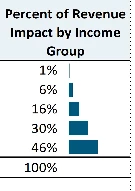
Manually, I believe I can recreate this effect using anchored frames within each cell, and setting the width of the anchored frame to correspond to a percentage of the total column width, then setting the object fill properties to get the color. I don’t currently know how/if it is possible to import an anchored frame successfully from XML and assign object properties that will translate, and all of my experiments so far have failed.
Is there an approach that would allow this? I have not used ExtendScript and would prefer avoiding it if possible, unless someone could get me started and convince me it wouldn’t be too involved to get it working. One alternative I may have to consider is to create an image of a blue bar, and then insert the image a few hundred times in the document with the width set there, but that would be less ideal than my proposed approach above. If I have to go the image route, the next issue I think I might have is setting the anchored frame anchoring position property through the xml or read write rules.
 AdChoices