October 22, 2011
Answered

XML-roundtripping and the TOC

  • October 22, 2011
  • 1 reply
  • 633 views

Hi All,

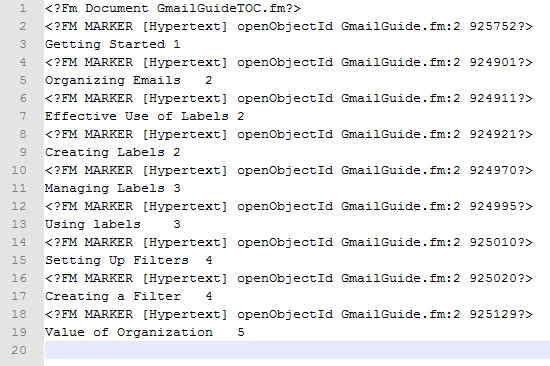
Working in Structured FM 10 - I have a compliant, structured book, a working structured application & template, and have successfully made the round trip from FM > XML > FM again. I save the book as XML, and FM creates an XML file, which looks for 3 files: E01 (frontmatter file), E02 (TOC file) and E03 (Chapter file).  One small problem - the TOC is a regular file afterward.  The markers seem to be there, but it's not something I can update and it doesn't behave according to the TOC reference page.

Here is the XML for the TOC:
Here is the resulting TOC:
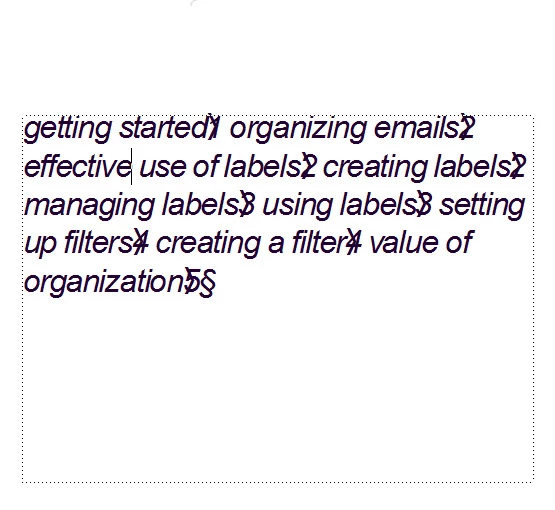
I'm fairly new to the round trip, so I don't know whether I'm expecting to much to ask for a regular TOC to be generated out of the process or not.  Is it possible, or will I always need to go back into the book, delete the file (or just not generate it in the first place), and re-create it as a TOC?

Regards,

Hannah

This topic has been closed for replies.
Correct answer Michael_Müller-Hillebrand

Hannah,

There are several things which are not handled by default by FrameMaker when round-tripping to XML. I (and others) had the chance to mention this (again) to the FrameMaker development team during their visit to the tcworld conference last week. There was a nice get together with the team (good food, etc.). I am distracting…

Without extra efforts you will loose e.g. all the book component settings, i.e. all the information you can control in the book. Among those are: settings for generated files, pagination and numbering settings.

It is an ongoing discussion whether such formatting-related properties should be saved to XML (which is meant to be content without formatting, from a certain POV). OTOH, the workflow you use is not unusual at all, I have implemented it in several projects. But all those projects use additional custom scripts to "fix" the formatting issues after opening the XML "book". Those scripts can not be used in general as they implement exactly the pagination/numbering requirements of each client’s document type.

Another option would be to have a so-called structured client which would write the properties into the XML and read/apply them accordingly when opening the XML. But that is something I would expect from Adobe.

- Michael

1 reply

Michael_Müller-Hillebrand
Legend
October 23, 2011

Hannah,

There are several things which are not handled by default by FrameMaker when round-tripping to XML. I (and others) had the chance to mention this (again) to the FrameMaker development team during their visit to the tcworld conference last week. There was a nice get together with the team (good food, etc.). I am distracting…

Without extra efforts you will loose e.g. all the book component settings, i.e. all the information you can control in the book. Among those are: settings for generated files, pagination and numbering settings.

It is an ongoing discussion whether such formatting-related properties should be saved to XML (which is meant to be content without formatting, from a certain POV). OTOH, the workflow you use is not unusual at all, I have implemented it in several projects. But all those projects use additional custom scripts to "fix" the formatting issues after opening the XML "book". Those scripts can not be used in general as they implement exactly the pagination/numbering requirements of each client’s document type.

Another option would be to have a so-called structured client which would write the properties into the XML and read/apply them accordingly when opening the XML. But that is something I would expect from Adobe.

- Michael

October 24, 2011

Hi Michael,

Thanks for the tip.  I wondered if that was the case, and I can understand why it might be set up that way - from the POV of XML as a context-less format.

It does put a bit of a damper on the flow I described, since it will always require extra set up afterward...but that's alright.  I suppose if it got to be too automated, I might be out of a job. 

I would be interested to know what one of your scripts looks like, if you wouldn't mind sharing it as a sample.

Thanks again for the info.

Regards,

Hannah