Known Participant
October 18, 2024
Answered

空白ページ一括削除の方法について

  • October 18, 2024
  • 1 reply
  • 925 views

こんにちは

いつもお世話になっております。

DTP編集の初心者です。


フレームメーカー2020で編集をしています。編集している際に毎回ページ末に空白ページができてしまいます。

例えば、50ページあるデータを編集して最終的に20ページになった場合に残りの30ページが空白ページとして残ります。いつも手動で30ページを削除しています。

ブックに.fmデータが20ファイルあった場合、30ページ削除を20ファイル繰り返し実施しています。

ブックで一括削除する既存コマンド及びスクリプトはないでしょうか

ご教示のほどよろしくお願いします

    This topic has been closed for replies.
    Correct answer FrameMaker-dk

    Please look very closely at the last page and the second last page in the document, and check whether you may have forgotten an object on those pages. Perhaps a white rectangle, a line or something else.

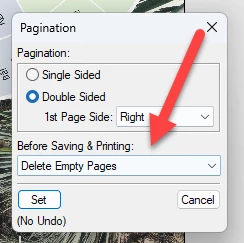
    If the documents pagination settings (Format-Page Layout->Pagination)  have been set up to delete empty pages like this:


    .... FrameMaker should delete the empty pages. BUT if there is an object - even a small object - FrameMaker won't delete the pages,  because they are not empty.

    1 reply

    Bob_Niland
    Community Expert
    Community Expert
    October 19, 2024

    re: Every time I edit, a blank page is created at the end of the page.

    This does not sound like anything that would normally be expected from FM. There are situations resulting in one or two unexpected blank pages, but not 30.

    Customary practice does not include attempting to delete pages per se, as they are likely to be automatically recreated until the root cause is addressed. And important user content can be lost trying to manually delete pages.

    Perhaps the first thing to look for is Body pages that are Disconnected Pages.
    Also inspect all the Master Pages, and see if the Reference Pages contain a MasterPageMaps table.
    Running an Apply Master Pages operation may fix this, but I'm inclined to bet that it will not.


    geso10Author
    Known Participant
    October 19, 2024

    ご返信ありがとうございます元々、50ページあった.fmデータに対して、不要なエレメントを削除していったら、結果的に20/50ページになりました。その際、通常は、自動的にページが20ページになると言うことでしょうか?

    よろしくお願いします

    FrameMaker-dkCommunity ExpertCorrect answer
    Community Expert
    October 19, 2024

    Please look very closely at the last page and the second last page in the document, and check whether you may have forgotten an object on those pages. Perhaps a white rectangle, a line or something else.

    If the documents pagination settings (Format-Page Layout->Pagination)  have been set up to delete empty pages like this:


    .... FrameMaker should delete the empty pages. BUT if there is an object - even a small object - FrameMaker won't delete the pages,  because they are not empty.

    Bjørn Smalbro - FrameMaker.dk