Answered
Adobe fresco does not recognize tablet sensitivity wacom Intuos small 2019
drawing with the wacom is the same as the mouse, it does not recognize the pressure on any brush.

drawing with the wacom is the same as the mouse, it does not recognize the pressure on any brush.
Hello edwin,
Have you checked what the wacom settings say?
particularly in regards to Windows ink?
I don't have a Wacom, but check my tablet settings and see I got Windows ink ticked for my pen
If you have set different parameters for different apps (photoshop, illustrator, Fresco...) you need to check for all the different software.
If it doesn't work, try to uncheck it and test again (It should be checked, but sometimes there is some issues, particularly on Windows 10)
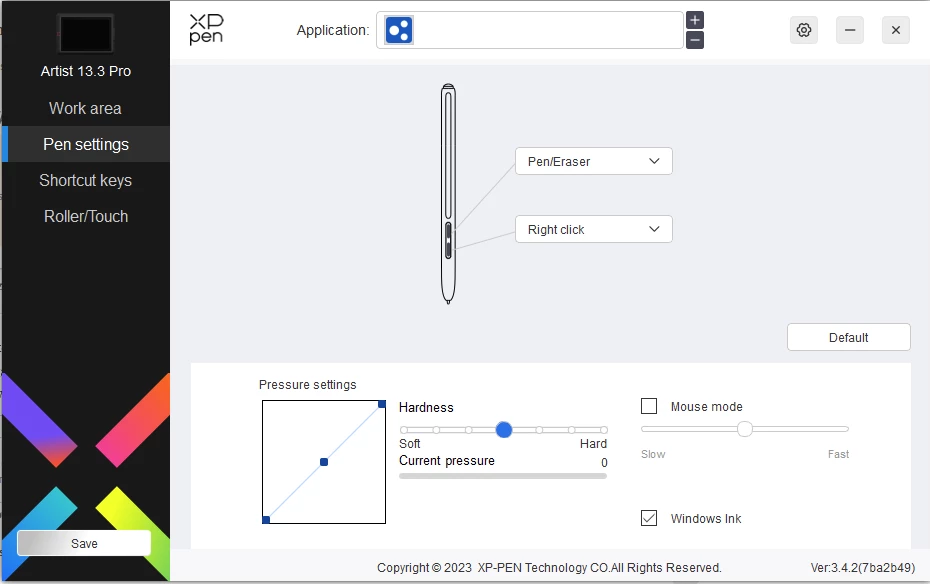
Let me know if that works!
Already have an account? Login
Enter your E-mail address. We'll send you an e-mail with instructions to reset your password.


 AdChoices