
Participant
March 6, 2021
Question

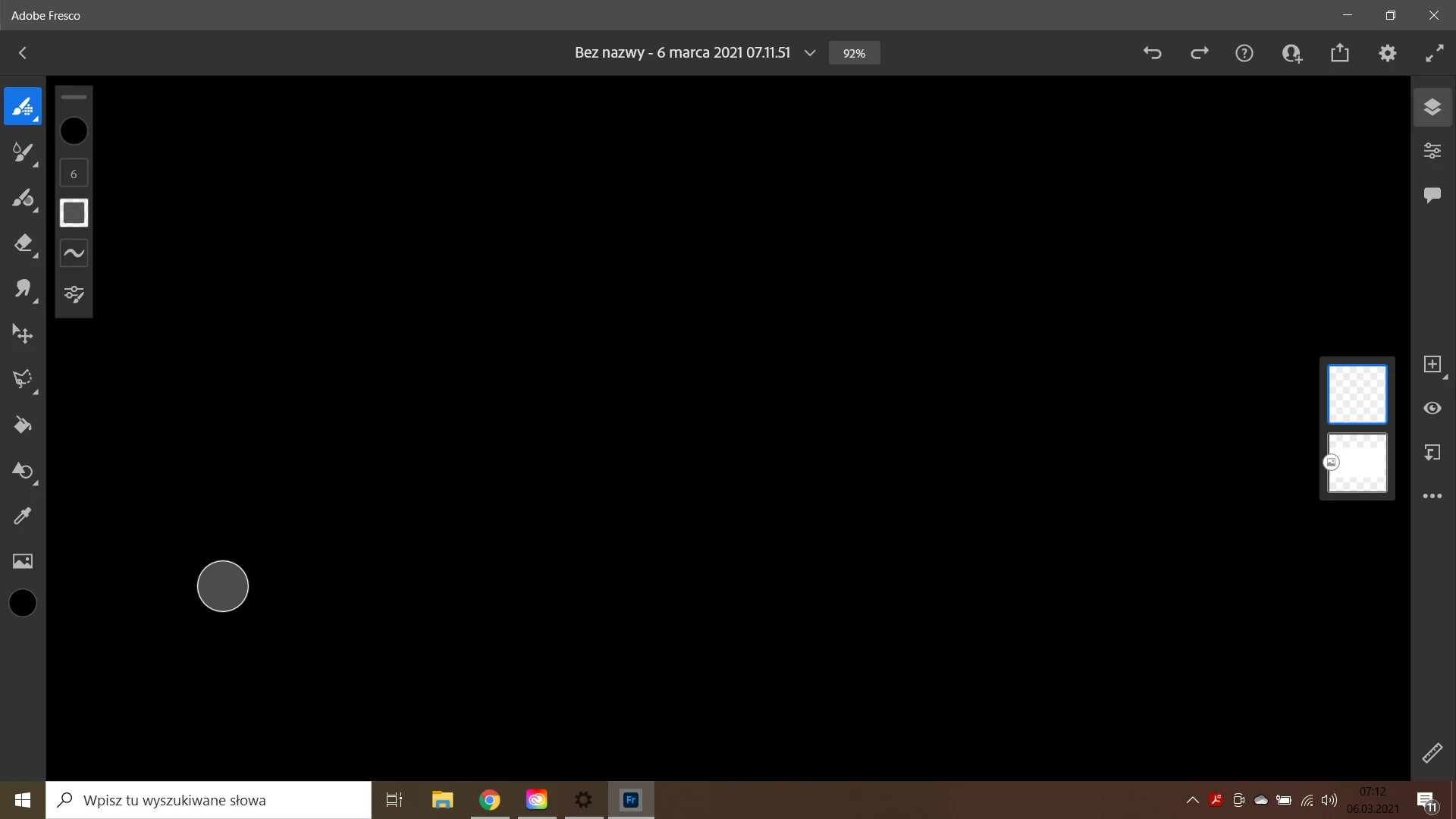
Adobe Fresco - no working space

  • March 6, 2021
  • 3 replies
  • 1660 views
Hello.
I have a problem with Adobe Fresco. After starting and creating a new document, the work area where I can draw is black. I can only see the effects of the work on the thumbnail. Other programs, such as Photoshop or Illuminator, work fine. The work area is white and the effects of work can be seen on the fly.
I followed the instructions and reinstalled the program. Did not help. I used Adobe Cleaner tooll tools, same effect.

The operating system is up-to-date, the drivers for the graphics card are up-to-date. Meets the hardware requirements.

Do you have any solution?
 

This topic has been closed for replies.

3 replies

Rohit Guglani
Adobe Employee
Adobe Employee
March 15, 2021

Hello Tom,

Few queries, what document size are you working on. Kindly share the GPU details with us. Are there any other programs running on your system like some screen recorder which could case this isssue? If yes, can you try after you close them. 

Can you do a quick pinch on the canvas and see if the canvas area comes up? 


We haven't seen this issue and would need little more information to assist you. 

Regards,

Rohit

Participant
March 15, 2021

Hi, i tried your suggestion and nothing. i tried the built in document sizes as well as my own 9x12 size. no success.


Sue Garibaldi
Community Manager
Community Manager
March 15, 2021

Hi Theresa.


Please message us through Fresco's Report A Bug link so we can see all of the device information that auto-populates the email (App Settings > Help > Support > Report A Bug). 


You don't have to repeat all of this when you write us there but please also send us dxdiag output of your system. Here's how to do that:
Choose Start, type dxdiag in the Search text box, and then press Enter.
Note: If you receive the message "Do you want to allow DxDiag to check if your drivers are digitally signed?" click Yes.
In the DirectX Diagnostic Tool, select the Save All Information


Those things will help the engineers troubleshoot this issue. 


Sue.


Those will help the engineers troubleshoot.

Community Expert
March 10, 2021

have you tried zooming out? What device are you using? 

Participant
March 12, 2021

tried this, doesn't work. i am using a compatible Windows 10 device.

Sjaani
Community Expert
Community Expert
March 10, 2021

Is it possible that somehow the canvas isn't starting in the main screen area?
Have you tried holding the space key to activate the hand tool, then using the mouse/pen to move around on the screen just to see if a canvas shows up.

Participant
March 12, 2021

I am having the same problem and your suggestion does not work. I cannot reach Adobe help either.