Participant
January 27, 2023
Answered

Adobe Fresco won't import my 25 brushes from an ABR file. Only 21 are imported.

  • January 27, 2023
  • 1 reply
  • 909 views

Does anyone know why only 21 brushes would import on Fresco and not the rest of the 4 brushes? Each time I import the brush file only 21 of the 25 brushes are imported. Any help would be greatly appreciated 🙂

This topic has been closed for replies.
Correct answer Imaginerie

Hello!

It happened to me before and it's very likely because some features are not compatible with Fresco. For example if you take legacy brushes from older versions of photoshop (I am thinking erodible tips etc), they won't show up in Fresco, despite being within an .abr folder.

Other features may include what you see on the left of the brushes panel (F5) in Photoshop.
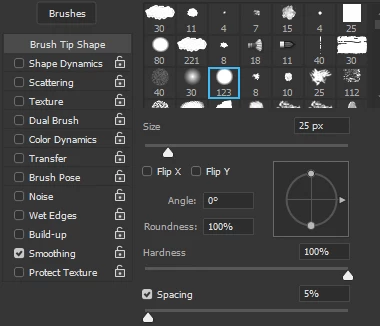
Most notably all that have to do with transfer, texture etc... that relies on additional assets built within the brush.

If you are able to identify which  brushes won't load, you can open them in Photoshop, tweak/remove all the unwanted options. Save and rename in the brush list, and export those 4 as an .abr, (or simply drag and drop into a library to share with Fresco) and they should load.

1 reply

Imaginerie
Community Expert
ImaginerieCommunity ExpertCorrect answer
Community Expert
January 27, 2023

Hello!

It happened to me before and it's very likely because some features are not compatible with Fresco. For example if you take legacy brushes from older versions of photoshop (I am thinking erodible tips etc), they won't show up in Fresco, despite being within an .abr folder.

Other features may include what you see on the left of the brushes panel (F5) in Photoshop.

Most notably all that have to do with transfer, texture etc... that relies on additional assets built within the brush.

If you are able to identify which  brushes won't load, you can open them in Photoshop, tweak/remove all the unwanted options. Save and rename in the brush list, and export those 4 as an .abr, (or simply drag and drop into a library to share with Fresco) and they should load.

Participant
January 27, 2023

Thank you so much! I'll try tweaking the brushes to see if it works. 

Imaginerie
Community Expert
Community Expert
January 27, 2023

If in doubt, analise one that is stimilar in effect and texture and that you know that works, and see what you can keep as options.

Let us know how it goes....