


Participant
Feb 5, 2024 7:45 PM UTC
Answered

Can't add my own font - Fresco Ipad

Hello,

I'm trying to add my own font to Fresco by using this tutorial: https://helpx.adobe.com/fresco/using/add-your-own-font.html


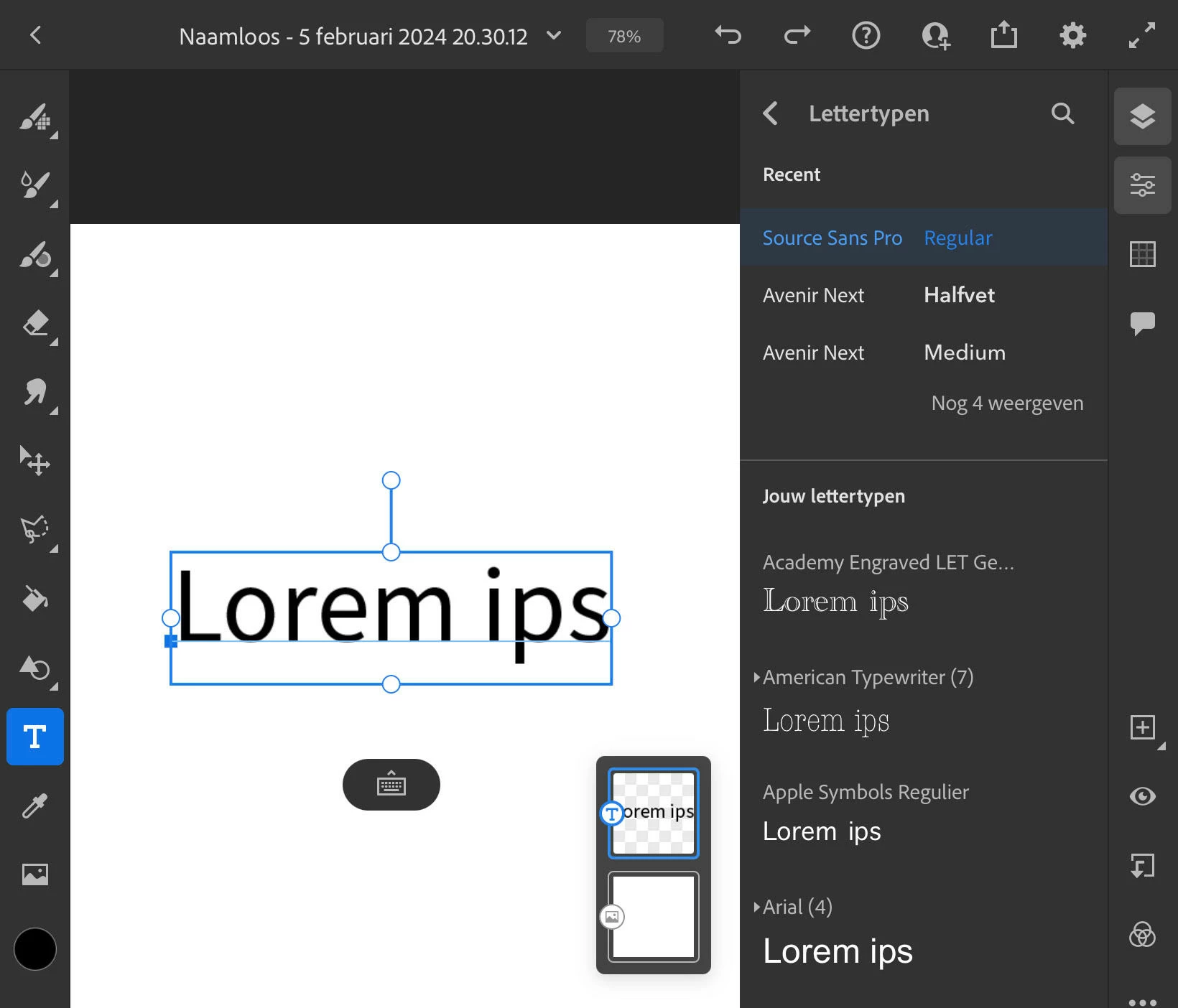
However, I don't see the + icon in my interface (see step 2 of the tutorial and screenshot), what should I do?


I really appreciate any help you can provide, thanks in advance!
AFADAMCorrect answer
Participant
Mar 18, 2025 10:47 AM UTC

A workaround that worked for me was to install Photoshop on my iPad, add my font there, and then it shows up in Fresco as well—without needing a separate subscription just for Fresco. However, you still need the Photographer Plan for Photoshop and Lightroom. It’s affordable and definitely worth the money!

10 replies

brein420
Participant
Jan 31, 2026 6:17 PM UTC

i have the same issue but don't have other pairs subscriptions how can I still add my own Made font into fresco

Translate
AFADAMCorrect answer
Participant
Mar 18, 2025 10:47 AM UTC

A workaround that worked for me was to install Photoshop on my iPad, add my font there, and then it shows up in Fresco as well—without needing a separate subscription just for Fresco. However, you still need the Photographer Plan for Photoshop and Lightroom. It’s affordable and definitely worth the money!

Translate
Participant
Mar 26, 2025 9:13 PM UTC
Thanks very much for this reply! I have the Adobe Creative Cloud all apps plan which includes Photographer Plan and Lightroom and I have Photoshop on my ipad. But I cannot see how to add a custom font. When I click onto “More fonts” I’m taken to the Creative Cloud ipad app, and when I click “fonts” in the lower right tool bar in the Creative Cloud app, I don’t see anywhere to add fonts. Nothing about fonts shows up. How were you able to add fonts to Photoshop on ipad?
Translate
Anshul_Saini
Community Manager
Community Manager
Apr 1, 2025 7:33 PM UTC

Hi @Anne257905868ei7,


Thanks for your patience! Since you’re using a business or federated account, you might not have the necessary permissions to add custom fonts directly. Here’s what you can do:

• Reach out to your Admin and check if they can add fonts or enable font permissions for your account.

• If the Admin is unable to do so, they can raise a ticket through the Admin Console and contact our enterprise team for further assistance.


Let me know if that helps, and feel free to reach out if you need further assistance!


Best,

Anshul Saini

Translate
Anubhav M
Community Manager
Community Manager
Feb 12, 2024 9:09 PM UTC

Hello @Niniee,


Thanks for reaching out. I was not able to find an active subscription for Fresco under the account you've signed on with on the community. The ability to add custom fonts in Adobe Fresco is currently only available with a Premium plan.


Feel free to reach out if you have more questions or need assistance. We'd be happy to help.


Thanks,
Anubhav

Translate
NinieeAuthor
Participant
Feb 12, 2024 9:15 PM UTC

Dear @Anubhav M ,


Thanks for looking into my case.

I do pay for the creative cloud via SURFspot Operational Console, so normally I do have access to premium features. Is this feature not included or how do I get access to it?


Greetings Leonie 

Translate
Community Expert
Feb 16, 2024 3:25 AM UTC

You can recommend things you would like to see here. https://www.adobe.com/products/wishform.html

Translate
NinieeAuthor
Participant
Feb 7, 2024 3:07 PM UTC

Extra info:

I have an iPad Air 4th generation and IOS 17.3

Fresco version 5.3.0

Translate
Participant
Apr 7, 2024 10:29 AM UTC

I am having the exact same issue with my iPad Air Fresco Version 5.4.1. iPad Air 5th generation. I also have a paid subscription to Adobe CC, and have all the paid features in Fresco

Translate