lleenhouts
Participant
February 17, 2020
Répondu

Can't see CC Libraries in colors

Hello!  New Fresco iPad user here and, while I have the latest version (1.3.1) of the software, I can't access or even see my CC color libraries.  Same is true for brushes.  I upgraded to the premium version in hopes that that would help, but it didn't.  Has anyone had the same issue and did you get it to finally work?  How?Thank you!

Ce sujet a été fermé aux réponses.
Meilleure réponse par Michael J. Hoffman

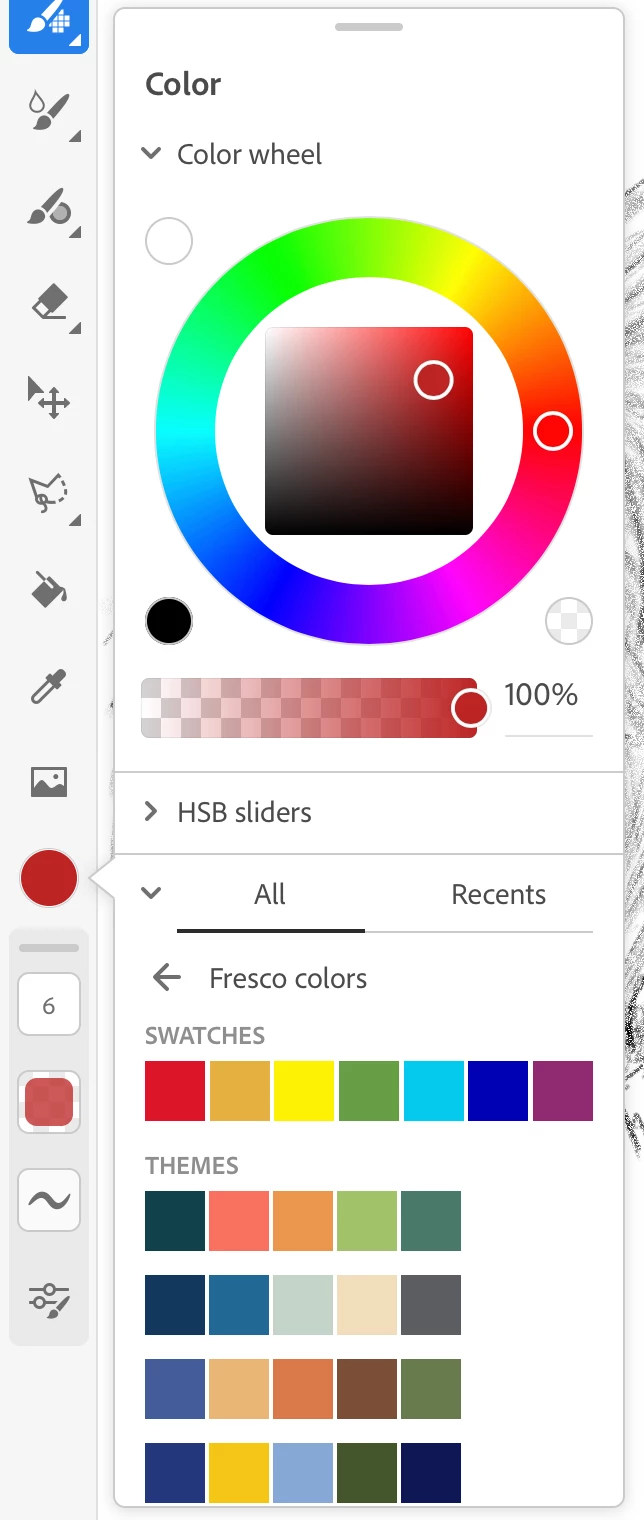
When I'm looking at "Fresco Colors," There's a back arrow icon that takes me to the list of CC Libraries. I don't see that in your screen shot... I'm also v1.3.1 on an iPad Pro 11" - here's my view - notice the back arrow, which you seem to be missing:


3 commentaires

Participant
February 6, 2021

I have the same issue! Did you manage to find a solution?

Inspiring
February 6, 2021

Hello, vous devez être connecté avec le même unique account à Adobe Creative Cloud et votre iPad doit être avecune connection Internet active pour que les bibliothèques de couleurs disponnibles dans votre bibliothèque Creative Cloud.
Vesrion actuelle de FRESCO : version 2.1.0

Yves Crausaz, Suisse, retraité actif dans le monde de la photo et des arts graphiques.
Michael J. Hoffman
Community Expert
Community Expert
February 19, 2020

When I'm looking at "Fresco Colors," There's a back arrow icon that takes me to the list of CC Libraries. I don't see that in your screen shot... I'm also v1.3.1 on an iPad Pro 11" - here's my view - notice the back arrow, which you seem to be missing:


Sjaani
Community Expert
Community Expert
February 18, 2020

Where have you looked for the colour libraries? If I tap on the colour picker (circle), then expand All  at the bottom I can see two options Fresco Colors and Colour Themes, the 2nd one is the name of the location all my colour themes are saved to.

lleenhouts
Participant
February 18, 2020

Looking in the same place, all I see is Fresco Colors.  I'm baffled why I can't see my colors!  Thanks for your help.

Sjaani
Community Expert
Community Expert
February 20, 2020

Have you tried to uninstall/reinstall yet?
Do you have the paid or free version? 
When I'm in Fresco Colors I also have the arrow pointing backwards as shown in Michael's image.