


Inspiring
Jul 3, 2023 6:06 PM UTC
Answered

Choosing a Color

Anyone have a solution to the following? When in Adobe Fresco, I go to select a color, it's always black and the pointer is sitting in the bottom Left of the square. So I have to move it to the upper Right to get a color. Is there any way to set things up so that when choosing color, the pointer is already in the top Right of the square?
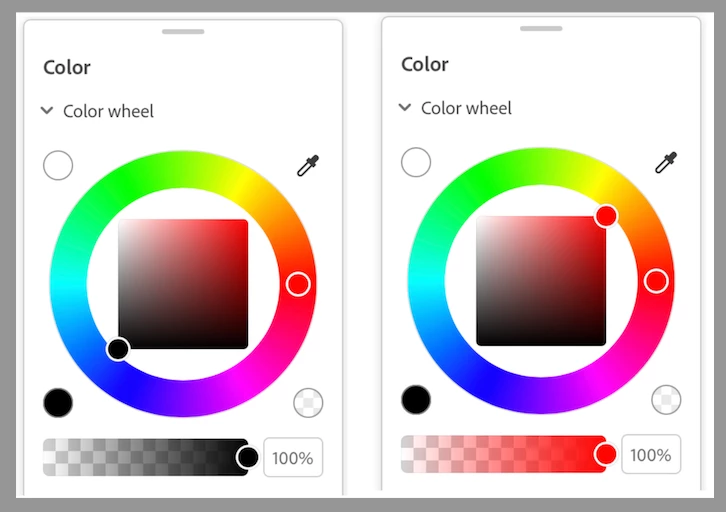
A small issue to be sure but it's a minor annoyance each time I have to do it.

This topic is closed to new replies. Start a new post to keep the conversation going.
ttibsenCorrect answer
Inspiring
Jul 4, 2023 4:02 PM UTC

OK - thanks for setting me straight on that theJB - not a big deal as I have said but I just wanted to ensure that I'm not overlooking a possible fix.

3 replies

thejanebradbury
Community Expert
Community Expert
Jul 4, 2023 6:33 AM UTC

I don't think there is, no. The default colours for Photoshop and Illustrator are also black (stroke) and white (fill) so Fresco is following the usual behaviour in making the starting colour black. 

Translate
ttibsenAuthorCorrect answer
Inspiring
Jul 4, 2023 4:02 PM UTC

OK - thanks for setting me straight on that theJB - not a big deal as I have said but I just wanted to ensure that I'm not overlooking a possible fix.

Translate
thejanebradbury
Community Expert
Community Expert
Jul 5, 2023 7:10 AM UTC

You're welcome, sorry the answer was no 😕😕

Translate