



Question
Color dynamics for pixel brushes - Fresco 3.7
Similar to the feature in Photoshop, Color dynamics for pixel brushes determines, how the paint color changes over the course of a stroke.
The Color Dynamics option is now available under Brush settings as shown below
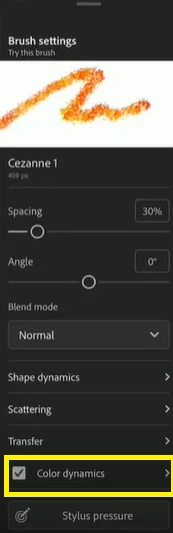
The various settings available under Color dynamics are as shown below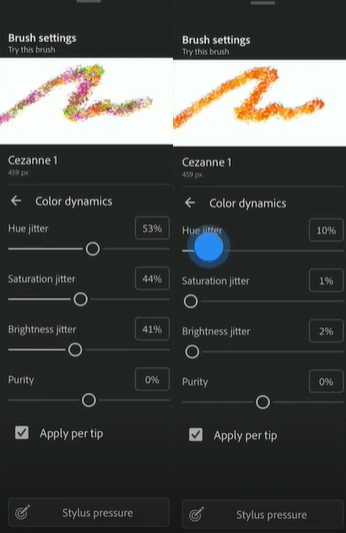
- Apply per tip:- Specifies changing color for each distinct tip stamp in a stroke. If unchecked, dynamic changes occur once at the beginning of each stroke. You can vary color between strokes, rather than within each individual stroke.
- Hue Jitter:- Specifies a percentage by which the hue of the paint can vary in a stroke.
- Saturation Jitter:- Specifies a percentage by which the saturation of the paint can vary in a stroke.
- Brightness Jitter:- Specifies a percentage by which the brightness of the paint can vary in a stroke.
- Purity:- Increases or decreases the saturation of the color.
Note:- Color dynamics option is not available for Sketching Brushes & Marker brushes.
For more details about Color dynamics, please click here.
To help us have focused discussions, create separate posts for feedback on this feature.
Thanks,
Vivek


 AdChoices