OK - I just played with the brush settings and realized that yes - when using a brush for masking - I do have control over the choice of brush so I can get the solid color after all by choosing an appropriate brush. Sorry about that - I should have played with the settings a bit more before posting. However, one thing does remain and that is - I still can't choose the color for the masking brush - all I have is the above color. It's somewhat academic since knowing that I can mask with a solid color, resolves my issue but it would still be nice to paint the mask with the color of my choice.
I tested both on the Ipad and on Windows and I can confirm my masks are black with no options to change the colours.
HOWEVER, it is possible that you have the "red overlay" set up...
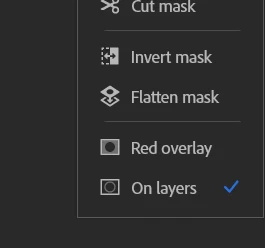
untick it in the layer masks actions, and you'll get the strokes black, as I have.
I completely forgot the red overlay thingy.



 AdChoices