
Participant
July 17, 2020
Question

Difficulty Importing a .psd file from Creative Cloud.

  • July 17, 2020
  • 1 reply
  • 340 views

Hello, Everyone.
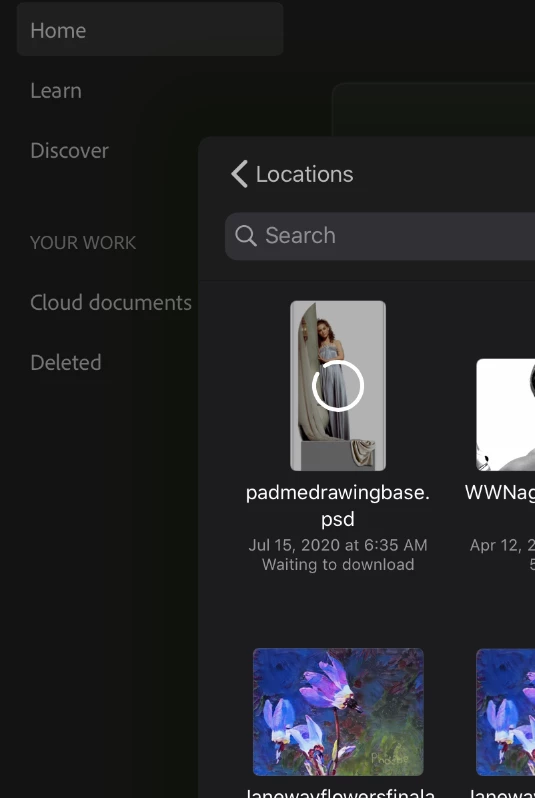
I am using an iPad, and attempting to import a 72 MB Photoshop file.
The file shows as available, but will not progress beyond "waiting to download" - hours of the spinning wheel.
Stats:
ios 13.6
Fresco build 1.7.1
I have:
Updated Fresco
Updated iPad
Shut down/restarted Fresco
Turned ipad off /on
renamed file

Not sure what else to do, but my deadline is getting closer by the hour.
 

This topic has been closed for replies.

1 reply

Participant
July 17, 2020

Let me add that in the time since posting this, I have deleted and re-installed Fresco, and have moved the image from creative cloud, renamed it, and reuploaded to CC.
Still having the same issue - although now, for the first time, I am getting the "Couldn't communicate with a helper application" message. There is nothing else open on my ipad, and as I've said, closing and restarting doesn't do any good.

Sue Garibaldi
Community Manager
Community Manager
July 17, 2020

Hi RW.


Not sure what's going on but do you have the Creative Cloud Mobile App on your iPad? If you do, give this a try:


Tap on the Files tab

Then tap the ellipses icon (...) under the PSD thumbnail then tap Download Original File to bring up a sharesheet of options.

From that sharesheet choose Copy to Adobe Fresco. 


Let me know if that works. 


Sue. 


Participant
July 17, 2020

Updating CC Mobile right now. Will let you know.