

ghotography
Participant
November 27, 2021
Answered

Driver Support - AMD Rareon Pro WX 4100

  • November 27, 2021
  • 2 replies
  • 737 views

Hi All,
I'm hoping one of you groovy people have solved the issues I'm struggling with.

I've upgraded to the latest driver for my graphics card, AMD Rareon Pro WX 4100.
I'm bang up to date with Windows 11 patching.
Still seems Fresco is incompatable, cites graphics driver as issue.

Is an AMD Rareon Pro WX 4100 card supported?

Am I missing a config step?

Many thanks.
This topic has been closed for replies.
Correct answer Anshul_Saini

Hi there,


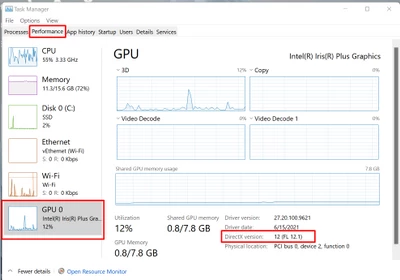
Sorry to hear about your trouble. I request you open the Task Manager, go to Performance > GPU > and check the DirectX version. If it is 12.1, then Adobe Fresco will be compatible with your GPU. Otherwise, it will not run on your device.


Regards,

Anshul Saini

2 replies

Anshul_Saini
Community Manager
Anshul_SainiCommunity ManagerCorrect answer
Community Manager
November 28, 2021

Hi there,


Sorry to hear about your trouble. I request you open the Task Manager, go to Performance > GPU > and check the DirectX version. If it is 12.1, then Adobe Fresco will be compatible with your GPU. Otherwise, it will not run on your device.


Regards,

Anshul Saini

ghotography
Participant
October 16, 2022

Come on Adobe, when am I going to be able to use Fresco?

Anshul_Saini
Community Manager
Community Manager
October 26, 2022

Hi @ghotography,


Sorry for the delayed response. As I mentioned earlier, AMD Radeon Pro WX 4100 was released in 2016 and is incompatible with DirectX 12_1. AMD Radeon Pro WX 4100 supports DirectX 12_0 due to hardware limitations & old architecture. The Fresco app is developed around Directx12_1, which is the must-have requirement to run it.


I hope this clarifies!


Regards,

Anshul Saini

ghotography
Participant
November 27, 2021

Clearly, that's meant to be a AMD Radeon Pro WX 4100