Participant
April 25, 2023
Answered

Expand/contract selection in Fresco?

  • April 25, 2023
  • 2 replies
  • 1950 views

Is there a way to expand your selection in Fresco? When I select my pencil layer with the magic wand, in PS, I usually expand the selection so the colour on the layer beneath it goes right under the pencil line but I can't seem to do this in Fresco which makes life harder! I know you can transform/scale it but it doesn't work the same way as expanding outwards.

Am I missing something as I'm new to Fresco or is it not possible?

Thanks in advance! 
Correct answer Sjaani

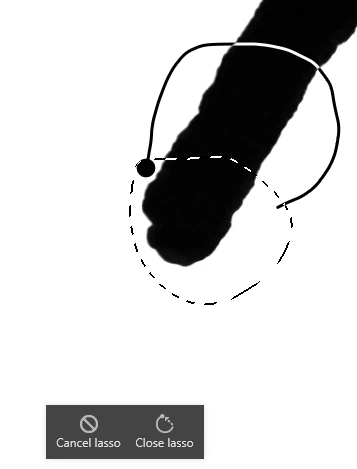
After your initial selection becomes marching ants you can draw solid lines with the lasso tool. A little panel appears with the options to Cancel or Close lasso. Click the Close option and your selection expands.


2 replies

Participant
April 26, 2023

Hi thanks so much for your reply! I didn't know you could do that so that's really helpful! Actually, I just solved the issue myself! If you press the circle twice when the transform tool is selected, it allows you to transform the selection from the centre outwards which allows the matching ants to expand if you drag outwards to scale up! 

Sjaani
Community Expert
SjaaniCommunity ExpertCorrect answer
Community Expert
April 26, 2023

After your initial selection becomes marching ants you can draw solid lines with the lasso tool. A little panel appears with the options to Cancel or Close lasso. Click the Close option and your selection expands.


Participant
October 8, 2024

Is there a way to expand or shrink the selection by a few pixels (like in Photoshop)? If not, do you know if this feature will be added soon? Thanks.

Anubhav M
Community Manager
Community Manager
October 8, 2024

Hello @Periscope Studios,

Fresco currently lacks this functionality. Would you mind creating a UserVoice for this feature request (https://adobe.ly/3XZYTmO) and adding your comments there? Doing this will help us prioritize this request, and you will be notified of any updates.


Feel free to reach out if you have more questions or need assistance. We'd be happy to help.


Anubhav