

Helen27693625g77v
Participating Frequently
January 20, 2023
Answered

[How To] Access color libraries from Fresco

  • January 20, 2023
  • 2 replies
  • 711 views

Happy New Year!

I have a colour issue: it seems that Fresco does not save recent colours across all my projects and I did not expect that.

I've opened Adobe Color to create my colour library there: how do I access it from Fresco?

Thanks in advance!


[Renamed by Mod]
Correct answer Imaginerie

Now the answer! 🙂
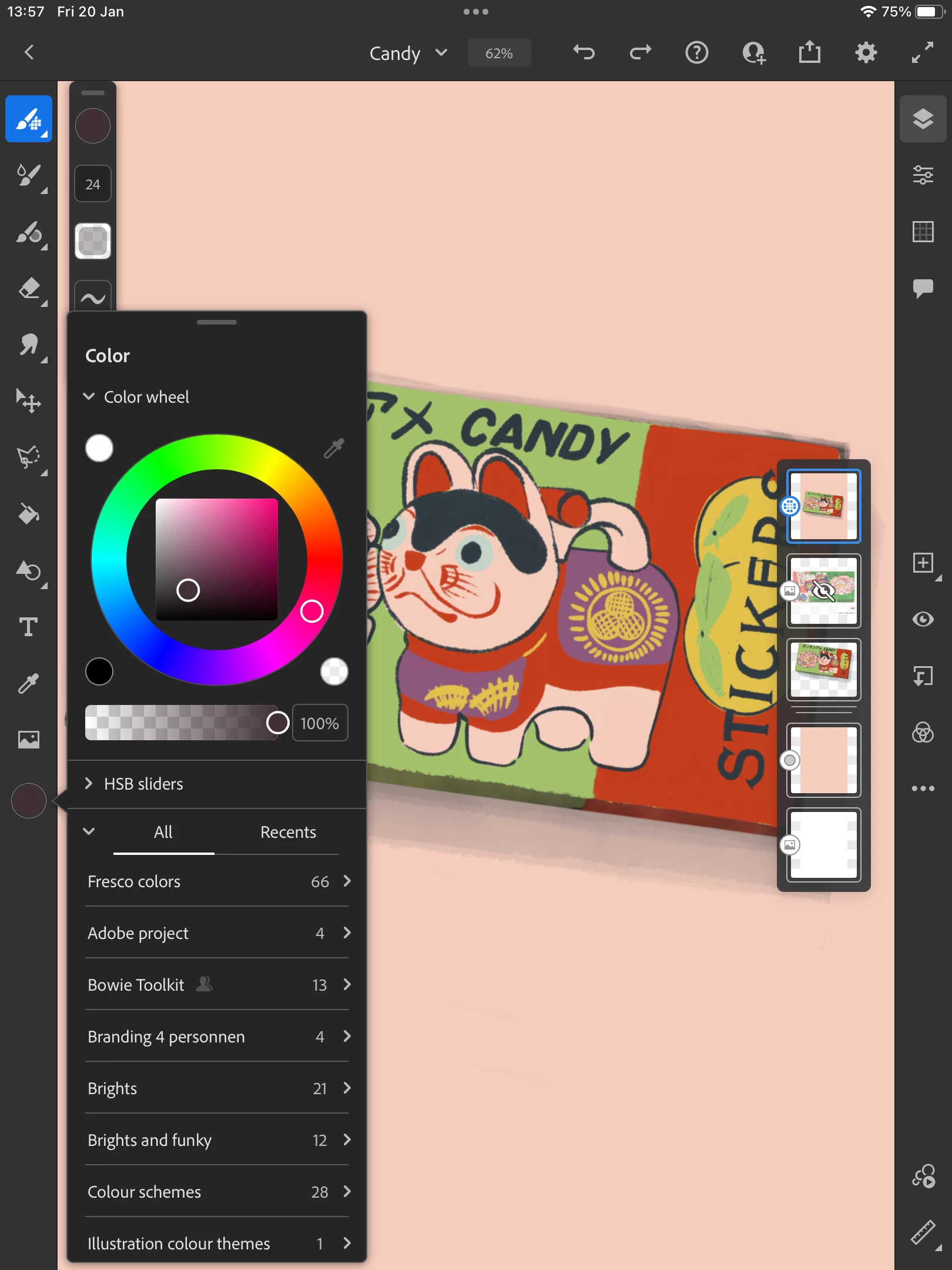
Your colour libraries are situated under the colour spot in the tools bar: see screenshot:


Click on the colour spot, scroll down to the bottom of the "all" tab (you get "all" and "recent")

You will find all your libraries there.

2 replies

Participating Frequently
August 3, 2025

I had the same question when I started using Fresco. It can be confusing at first! To access your color library from Adobe Color in Fresco, make sure you're signed in with the same Adobe account. Then, go to the color panel in Fresco and look for the  Libraries tab. Your saved color themes from Adobe Color should show up there.

Participating Frequently
August 10, 2025

This is super helpful! I was also stuck trying to find my saved themes in Fresco, and signing in with the same Adobe account solved it instantly. Going into the Color panel and checking the Libraries tab makes a big difference, especially when you’re switching between devices or projects. Having quick access to your color themes keeps the workflow smooth and creative sessions in a happy mood .

Imaginerie
Community Expert
Community Expert
January 20, 2023

Hi Helen, I moved your post to its own thread as it was a new question. You're more likely to find answers if it's a new query, as opposite as buried in another thread 🙂


Imaginerie
Community Expert
ImaginerieCommunity ExpertCorrect answer
Community Expert
January 20, 2023

Now the answer! 🙂
Your colour libraries are situated under the colour spot in the tools bar: see screenshot:


Click on the colour spot, scroll down to the bottom of the "all" tab (you get "all" and "recent")

You will find all your libraries there.

Helen27693625g77v
Participating Frequently
January 30, 2023

I just did it, thanks so much!!!

Have a beautiful day,

Helen