Participant
April 24, 2023
Answered

How to create a new on iPad

  • April 24, 2023
  • 1 reply
  • 254 views

This sentence is using a translator


When creating a new project, only "PSD" or Skech or DROW projects come up. (or open a canvas).
I want to open an image stored on my device and create a new one to fit the size. Is this possible?


Sorry if this is a simple question and there is an answer somewhere.

This topic has been closed for replies.
Correct answer Imaginerie

I am assuming you are talking about Adobe Fresco here.

If you want to open a project on Fresco, it will show PSD files as only PSD files are readable by Fresco (Psdc - or PSDCloud files are the app native file format)
If you want to create a new project from scratch at a specific size, you need to know the size before hand, unless Fresco can open it and lets you check the size before closing and creating a new one again (or you're OK to duplicate this file and use the copy to create a new artwork)
If you're working on a Windows machine, you can still check the image size by right clicking on the file and checking properties
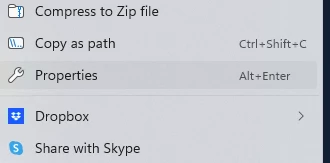
 

(ALT+enter)

then "details"
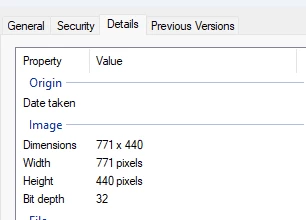
I don't think that's possible that easily on an Ipad...

1 reply

Imaginerie
Community Expert
ImaginerieCommunity ExpertCorrect answer
Community Expert
May 6, 2023

I am assuming you are talking about Adobe Fresco here.

If you want to open a project on Fresco, it will show PSD files as only PSD files are readable by Fresco (Psdc - or PSDCloud files are the app native file format)
If you want to create a new project from scratch at a specific size, you need to know the size before hand, unless Fresco can open it and lets you check the size before closing and creating a new one again (or you're OK to duplicate this file and use the copy to create a new artwork)
If you're working on a Windows machine, you can still check the image size by right clicking on the file and checking properties


(ALT+enter)

then "details"

I don't think that's possible that easily on an Ipad...