
Answered
[How To] Organize Brushes in Fresco
Switching brushes is not easy, when you need to find a specific brush, you should allow to create folders for brushes and direct access to your favorites from the main screen.
thank you
[Renamed by Mod]

Switching brushes is not easy, when you need to find a specific brush, you should allow to create folders for brushes and direct access to your favorites from the main screen.
thank you
[Renamed by Mod]
You can do that by creating brushes libraries (you can do it with a software that can create brushes - photoshop)
AS for favourites, you're in luck! there is a favourite section in Fresco that was greatly asked for!
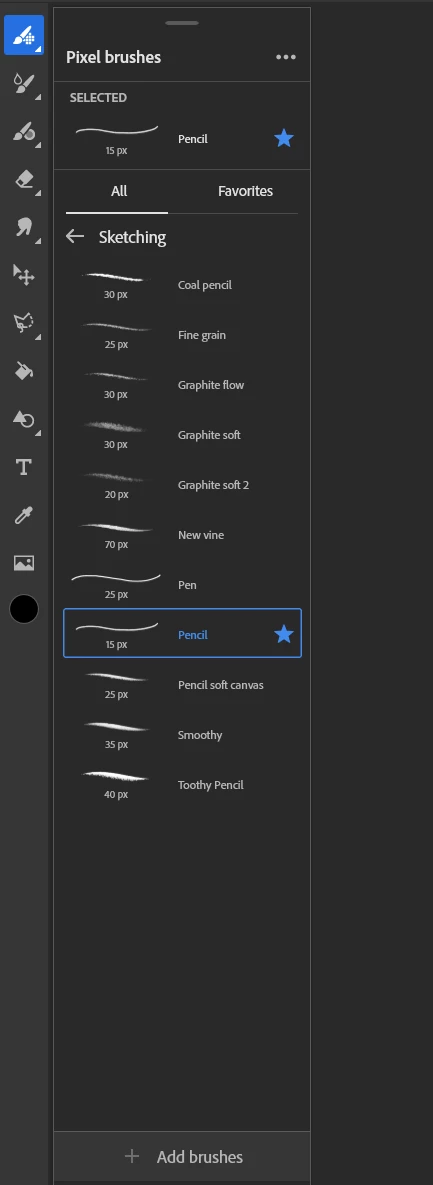
select your brush and click on the star beside like on my screenshot, and then you will be able to access it by clicking on the favourite tab (next to "all")
as for creating folders, you will need photoshop where you will be able to create your own folders with selected brushes in it, or create a new library with your selected brushes in it.
Already have an account? Login
Enter your E-mail address. We'll send you an e-mail with instructions to reset your password.


 AdChoices