Moises Levy
Participant
Dec 29, 2022 3:12 AM UTC
Answered

[How To] Organize Brushes in Fresco

My brushes on the ipad are not sorted as in the photoshop library, it is possible to look at my brushes as they are in PS?


[Renamed by Mod]

This topic is closed to new replies. Start a new post to keep the conversation going.
Imaginerie
ImaginerieCorrect answer
Community Expert
Dec 29, 2022 12:40 PM UTC

As far as I know, Fresco displays brushes groups/folders in an alphabetical order, with no option to move/drag them around as it is in the Photoshop brushes panel or the libraries.

But that would be interesting to have that as well in Fresco!

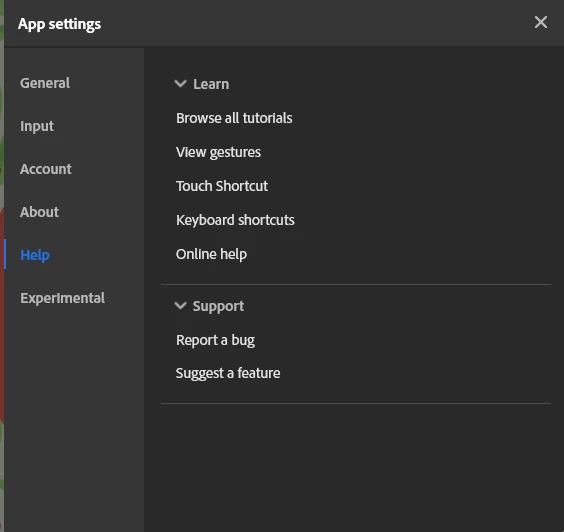
You can use the feature request embedded in the Fresco app (cog wheel at the top right>app settings> help>request a feature)


Once done, you can post it here so people interested in it, can vote for it (me included) and the votes will get the attention of the dev team... let's hope!

3 replies

Community Expert
Jan 2, 2023 9:30 PM UTC

At the moment? No. But I know that down the road they're talking about being able to save/create brushes within the app. Perhaps when they implement that, they might allow for sorting of brushes.

Translate
Moises Levy
Participant
Jan 2, 2023 11:09 PM UTC
Thank you! Hope they make it soon !

Enviado desde Outlook para Android<>
Translate
Imaginerie
Community Expert
ImaginerieCommunity ExpertCorrect answer
Community Expert
Dec 29, 2022 12:40 PM UTC

As far as I know, Fresco displays brushes groups/folders in an alphabetical order, with no option to move/drag them around as it is in the Photoshop brushes panel or the libraries.

But that would be interesting to have that as well in Fresco!

You can use the feature request embedded in the Fresco app (cog wheel at the top right>app settings> help>request a feature)


Once done, you can post it here so people interested in it, can vote for it (me included) and the votes will get the attention of the dev team... let's hope!

Translate