


Inspiring
July 4, 2023
Answered

Paint Bucket Doesn't Fill Selection Fully
  • July 4, 2023
  • 6 replies
  • 1008 views

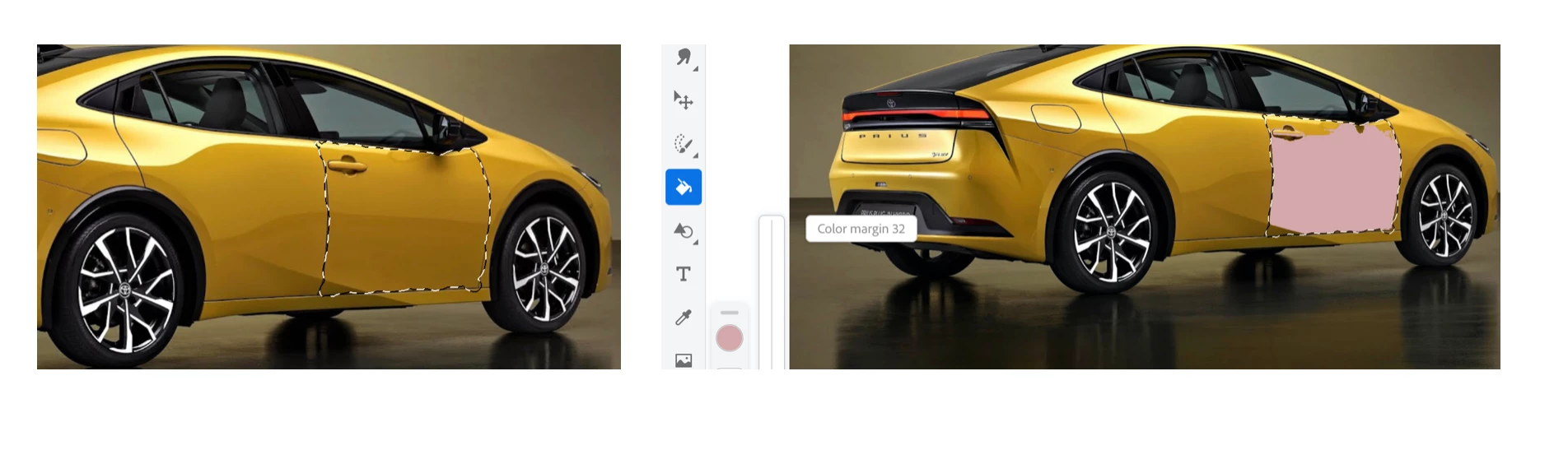
So what is going on here? I made a selection as shown on the L. Then I use the paint bucket to fill in the selection and instead of getting a complete fill, it's only a partial fill. Notice the unfilled areas at the top and bottom L of the selection. Now if I tap all these areas, they do get filled but shouldn't the initial tap in the selection fill it completely?

This topic is closed to new replies. Start a new post to keep the conversation going.
Correct answer thejanebradbury

When you have the Fill tool increase the Color Margin option - I can just see it in your screenshot. The higher the number the more of the area it will fill.

6 replies

thejanebradbury
Community Expert
thejanebradburyCommunity ExpertCorrect answer
Community Expert
July 5, 2023

When you have the Fill tool increase the Color Margin option - I can just see it in your screenshot. The higher the number the more of the area it will fill.

ttibsenAuthor
Inspiring
July 6, 2023

Yes - that worked. Putting up the color margin to the top 10% of the scale did fill it completely. Thanks for pointing that out JB.