
zoicnoz
Participant
October 2, 2020
Answered

paint bucket Fill leaving a gap how to fix this?

  • October 2, 2020
  • 2 replies
  • 4792 views

I been drawing with the vector brush.. and i am using the paint bucket to fill in different color.. but when i do that... it leaves an outline between the vector brush and the fill i did.. and i been look for 2 days on youtube and stuff but can't find this being addressed..  ( also is it possbile for me to fill in the color in another layer )  (i don't want to manually lasso everything )
Correct answer Sue Garibaldi

Hi Gavin.


This outline is caused by antialiasing artifacts when two objects have near identical edges. It has to do with the threshold an app uses to compare colors and is more noticeable when the two objects are close in color. 


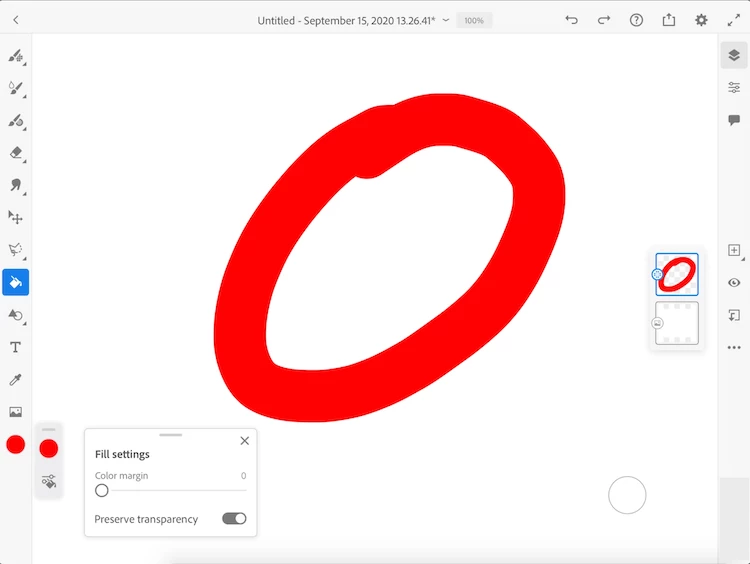
It does work to put a layer underneath and fill the gap area with the same color but  it's best tackled by using the Color margin slider. Here's a screenshot showing where that is:


Hope that helps.


Sue. 

2 replies

Participant
April 8, 2025

I was also having this issue. I found that if you fill it on the vector layer, then using a vector brush with the painting inside the lines on and go around the edges with both colors it helps reduce it seperation.

Sue Garibaldi
Community Manager
Sue GaribaldiCommunity ManagerCorrect answer
Community Manager
October 2, 2020

Hi Gavin.


This outline is caused by antialiasing artifacts when two objects have near identical edges. It has to do with the threshold an app uses to compare colors and is more noticeable when the two objects are close in color. 


It does work to put a layer underneath and fill the gap area with the same color but  it's best tackled by using the Color margin slider. Here's a screenshot showing where that is:


Hope that helps.


Sue. 

zoicnoz
zoicnozAuthor
Participant
October 2, 2020

I don't see that option? 

Sue Garibaldi
Community Manager
Community Manager
October 5, 2020

Hi Zoicnoz. 


My apologies, I just reread your post.... the Color margin will only be active for Pixel fill. For vector fill. definitely place a layer underneath your current layer and fill with that gap with either of the colors you're using. 


Sue.