
Inkygirl
Participating Frequently
October 14, 2019
Resuelto

Possible to name layers? (for when thumbnail images are too faint to differentiate from other layers

  • October 14, 2019
  • 3 respuestas
  • 3715 visualizaciones

I just recently discovered Adobe Fresco and love it so far.


A question for others who create different layers for sketches before doing final inking: I sometimes find it difficult to differentiate the layer thumbnails, especially when the layer only contains a faint sketch outline. I tend to use a lot of layers, and find it a pain to have to open up the various layers to remind myself of the contents. In Procreate, I can name layers but as far as I can tell, there doesn't seem to be  way of naming layers in Fresco.


Has anyone else experienced this? If so, what is your workaround?


Thanks in advance for any suggestions!


Debbie
Mejor respuesta de Michael J. Hoffman

Hi Debbie,


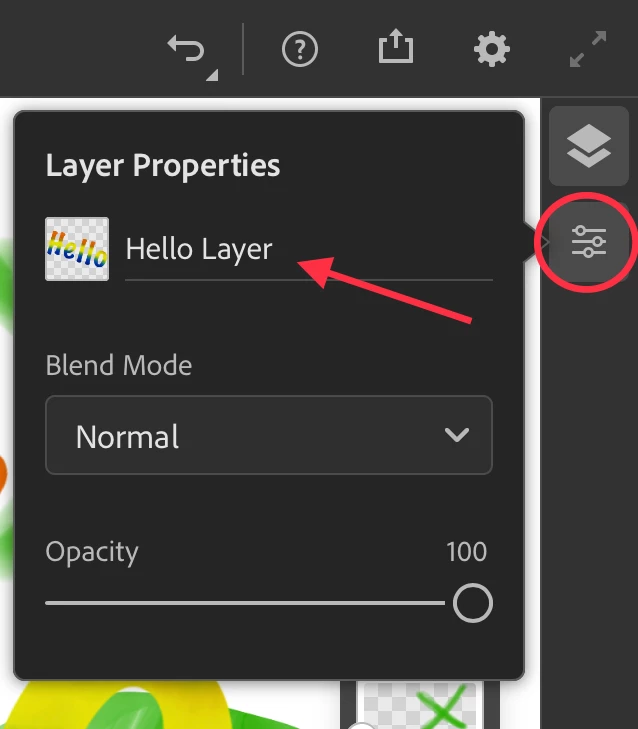
I have good news and bad news. The good news is, you can indeed name your layers. Just tap the Layer Properties icon in the toolbar. The bad news is, there's no option to show the layer names in the Layers Panel. The layer names would carry over to Photoshop, so if you opened a file there you'd see it, but in Fresco, there's no expanded Layers view:


3 respuestas

Known Participant
October 18, 2024

Yes I think Fresco is good but its layers are probably one of the weakest point. You cant see the name. Just make an normal layer menu as an option please. Look at infinite painter , they have same compact layers like Fresco, but also give option to see a normal layer list which is much better for projects as you use more layers. Just more quality of life features are needed in general that Fresco should consider adding in comparison to other big name apps to make it have a more enjoyable workflow.

Community Manager
October 18, 2024

Hello @CoreyArt26165972jfnk,

That's a great idea. Would you mind creating a UserVoice for this feature request (https://adobe.ly/4hdmbhS) and adding your comments there? Doing this will help us prioritize this request, and you will be notified of any updates.


Feel free to reach out if you have more questions or need assistance. We'd be happy to help.


Anubhav

Participant
September 5, 2021

I too would like to see layer names added to the thumbnails. Thank you for all you do. I love the Adobe Suite and Fresco.

Participant
October 1, 2021

They could simply add it below the thumbnail or even have it display when selected by putting the name next to the title of the document. I also believe it would be nice to change the boarder color of each thumbnail so that you could easily tell which group of layers are (such as highlights and shadows for instance). Affinity Photo and Designer allow these features. Overall the design of the toolbars and settings are legit, but these are my only issues with Fresco and it's extremely frustrating to say the least. They really need to update it. If they did I would actually pay for the subscription, this is how frustrating it actually is.

Participant
January 12, 2022

Yes - an essential feature really and incredible that it doesn't have this as standard - the content of layers is indecipherable from the thumbnails - having to click on layer properties to see the name is clumsy - needs to be on the thumbnails


obviously not an adobe priority given the age of the posts here going back to august 2020... now everyone Has been forced to use fresco since the January 10 shutdown of adobe sketch maybe it will happen…? Hopeful....

Michael J. Hoffman
Community Expert
Community Expert
October 14, 2019

Hi Debbie,


I have good news and bad news. The good news is, you can indeed name your layers. Just tap the Layer Properties icon in the toolbar. The bad news is, there's no option to show the layer names in the Layers Panel. The layer names would carry over to Photoshop, so if you opened a file there you'd see it, but in Fresco, there's no expanded Layers view:


Participant
August 17, 2020

What the point of naming layers if there is no way to see the names? I don't mean to be derogatory. Is there some other use for layer names? I used them in Sketch to make it easier to differnetiate the layers more easily since the thumbnails are necessarily small.