Participant
October 20, 2019
Answered

Resize/transform layer after import?

  • October 20, 2019
  • 1 reply
  • 4418 views

In Adobe Sketch and other products, it is easy to select a layer and resize it after it has been created or imported.  I don't see any option in the Fresco layer menu to transform, change size, rotate, etc.  Surely it is possible?  Can someone tell me how?

This topic has been closed for replies.
Correct answer Michael J. Hoffman

Hi Marley,


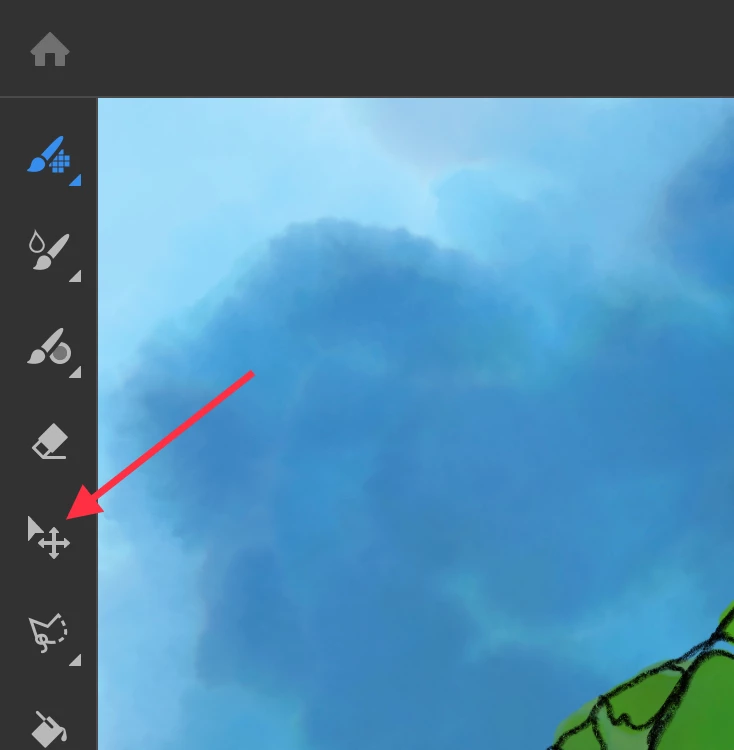
Just select the layer in the Layers panel, then tab the Transform tool. You can then move, scale, rotate and mirror the layer. 

1 reply

Michael J. Hoffman
Community Expert
Michael J. HoffmanCommunity ExpertCorrect answer
Community Expert
October 20, 2019

Hi Marley,


Just select the layer in the Layers panel, then tab the Transform tool. You can then move, scale, rotate and mirror the layer. 

marley9Author
Participant
October 21, 2019

Perfect, thanks!  I just got thrown off after working in Draw...