
LifeMeansChange
Participating Frequently
December 10, 2024
Question

Searching for Fonts in Adobe Fresco on Windows

  • December 10, 2024
  • 1 reply
  • 177 views

I'm trying to look for a specific font in Adobe Fresco in Windows. I don't see an option to search or type in the name of the font I'm looking for. Am I missing it somewhere? I saw in a video from adobe creative that there was a search magnifying glass to the right of the word Fonts but I don't see that in my version. Not sure if that's because I have a newer version of Fresco or because it's a bug and it's just not there. This is what I see
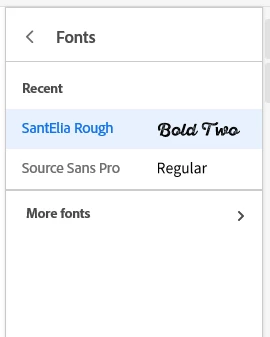


This topic has been closed for replies.

1 reply

Anubhav M
Community Manager
Community Manager
December 11, 2024

Hello @LifeMeansChange,

Thanks for reaching out. You can activate fonts using the Creative Cloud Desktop application on Windows: https://adobe.ly/41sfO4Y


Feel free to reach out if you have more questions or need assistance. We'd be happy to help.


Anubhav

LifeMeansChange
Participating Frequently
December 11, 2024
It's already been activated. The issue is that Fresco does have the option
to search for fonts as illustrated in the screenshot unless I'm missing
something.