
Participant
August 19, 2022
Answered

The 'Report a bug' button doesn't work (Windows 10)

  • August 19, 2022
  • 4 replies
  • 379 views

When I press the button to report a bug it opens an empty window in my internet browser (Google Chrome in this case) and does nothing else. The suggest a feature button seems to work and leads to https://adobefresco.uservoice.com/, but I am unsure if that is the correct place to report bugs.
This topic has been closed for replies.
Correct answer Anubhav M

Hello hardRoundSizeFlow,


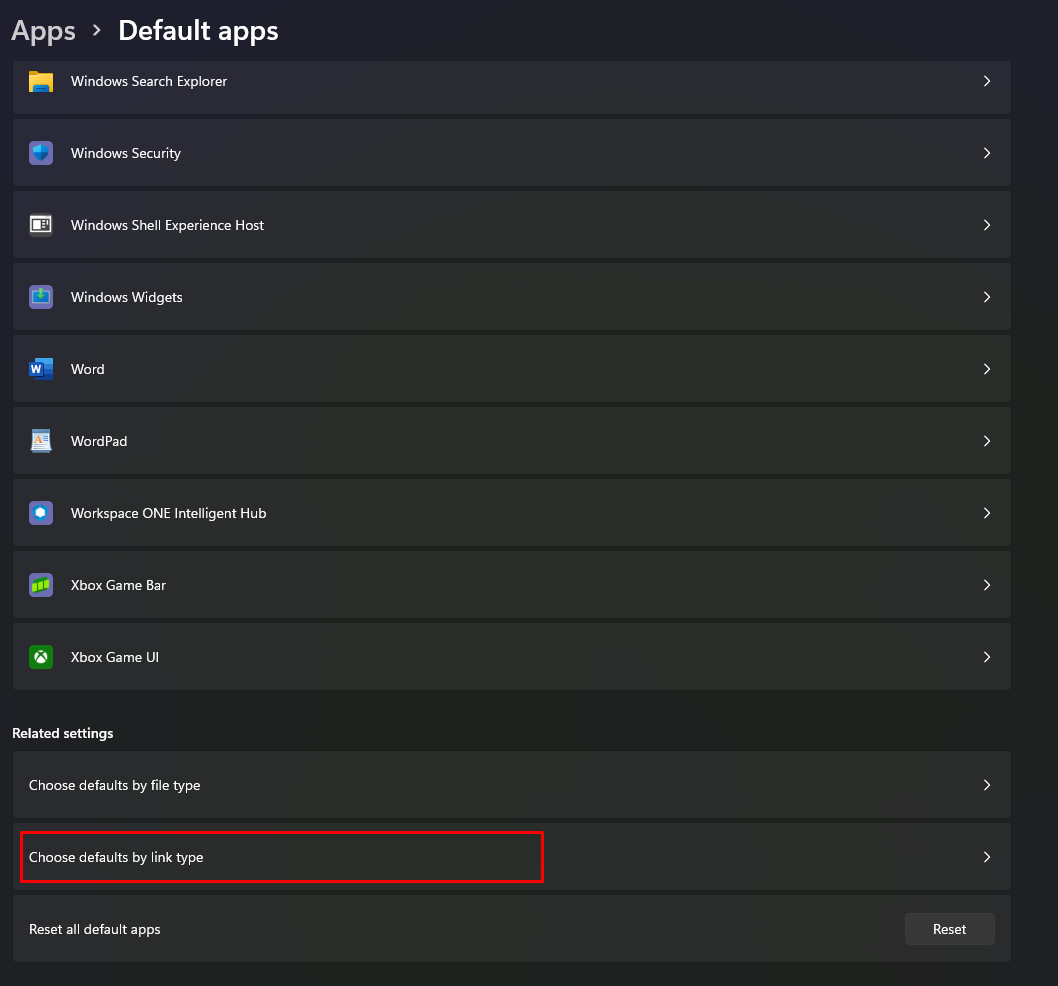
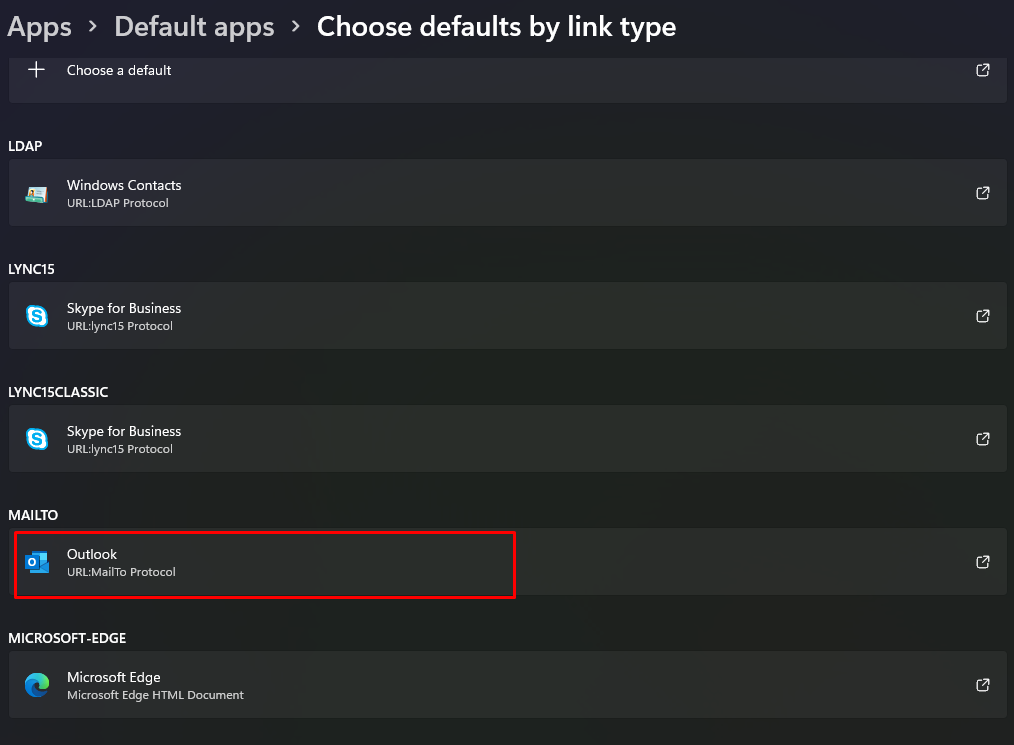
Sorry to hear about this experience. The "Report a Bug" triggers an email that would be handled by the default mail application on your computer.


Kindly try changing the MAILTO application default under Windows Settings to an email client like Outlook/Thunderbird and share your observations.


Looking forward to your response.


Thanks,

Anubhav


Note: Marking correct for visibility.

4 replies

Sjaani
Community Expert
Community Expert
August 24, 2022

Feature requests and bug reports are definitely different.

As others have already focused on the expected result of chosing 'Report a bug'. I'm curious... What is the bug you were hoping to report when you ran into the issue of not having the email client open to allow you to report it?

Anubhav M
Community Manager
Anubhav MCommunity ManagerCorrect answer
Community Manager
August 23, 2022

Hello hardRoundSizeFlow,


Sorry to hear about this experience. The "Report a Bug" triggers an email that would be handled by the default mail application on your computer.


Kindly try changing the MAILTO application default under Windows Settings to an email client like Outlook/Thunderbird and share your observations.


Looking forward to your response.


Thanks,

Anubhav


Note: Marking correct for visibility.

Michael J. Hoffman
Community Expert
Community Expert
August 19, 2022

Just for comparison, I also used the "report a bug" feature on my Windows machine, and here is what went into the body of the email. Note that if you didn't get an email opening up, you may not have your mail handling options configured properly in the OS to open your mail client. When I did this in Windows the first time, it asked me which program to use for mail links:


App Version: 3.8.0.1027 (Windows)
OS Version: 10.0.22000.856
Device Model: Gigabyte Technology Co., Ltd. (Z690 AORUS ELITE AX DDR4)
Available Memory: 21519 MB
Total Memory: 32609 MB
Free Disc Space: 795742 MB
Total Disc Space: 953147 MB
GPU Name: NVIDIA GeForce RTX 3070
GPU Driver Version: 31.0.15.1693

Michael J. Hoffman
Community Expert
Community Expert
August 19, 2022

The "Report a Bug" feature should open your email editor, with a mail addressed to frescohelp@adobe.com - with the subject line, "Fresco bug report." You could create this manually on your own.


In the body of the mail, it pre-populates data according to your app and device. For example, with my iPad Pro, I get the following data in the body of the email:


App version: 3.8.0.3.8.0.1625 (64-bit)

OS Version: 15.6

Device Model: iPad Pro 1 (11") (iPad8,1)

Available Memory: 3069 MB

Total Memory: 3783 MB

Free Disc Space: 347412 MB

Total Disc Space: 488234MB