Answered
Verwischen in Vektorebenen Adobe Fresco
Ich würde gerne Pinselstriche in den Vektorebenen verwischen, geht das irgendwie?

Ich würde gerne Pinselstriche in den Vektorebenen verwischen, geht das irgendwie?
Hi!
No it isn't possible without converting your vector layer into a pixel layer.
Blurring would be a raster effect and it's not possible in fresco (applying a raster effect to a vector path would only be possible in Illustrator - without converting, that is)
you can convert your layer here (bottom of the list)
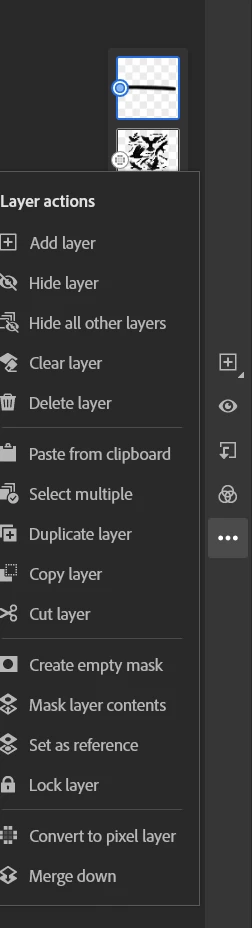
I don't speak german but I think the menu entry should be self explanatory.
Then you'll be able to blur by using the smudge tool.
I think you'd have more luck by either finishing your artwork, and open it in Photoshop at the end (saving a copy) and blur the lines after they're converted in Photoshop, or export the file into illustrator and apply a blur raster effect from there. The options do do it manually (on selected areas) are greater in Photoshop, but only Illustrator will retain the vector attributes of those paths.
Let me know if it makes sense 🙂
Already have an account? Login
Enter your E-mail address. We'll send you an e-mail with instructions to reset your password.


 AdChoices