December 23, 2025
Answered

有人遇過文字緒建立完成檔案崩潰後全部亂掉嗎?

  • December 23, 2025
  • 1 reply
  • 133 views

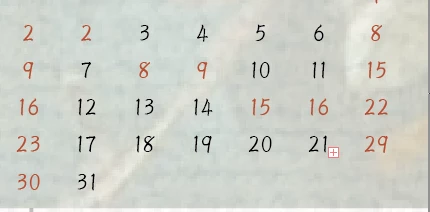
製作月曆、桌曆時建立數字文字緒,程式突然消失,重新開啟後發現所有建立過的數字文字緒都亂跑位置,或是數字大小變得不統一,求助QAQ

照理來說週日及週六已經設定完成紅色,跳掉後數字順序不對,顏色也變得亂七八糟
還不低個工作區域,是所有工作區域的文字緒都亂掉

Correct answer Anubhav M

Hello @Melodic_Coast2463,

Thanks for confirming. If Illustrator is unable to recover the file after relaunching, it is likely that the file is lost. We understand this may not be the ideal outcome, and we apologize for any inconvenience caused.


Storing files on an external/network drive or a cloud-synced folder can sometimes lead to corruption issues. To prevent this from happening in the future, we recommend saving your work locally first and then manually copying it to your desired backup location or saving it as a cloud document and keeping multiple copies of your active work.


For help with crashes, please try the suggestions shared in this help article (https://adobe.ly/4jaMpDb) and let us know how it goes.

Please don't hesitate to contact us if you have any further questions or require assistance. We're here to help.

Anubhav

1 reply

Anubhav M
Community Manager
Community Manager
December 23, 2025

Hello @Melodic_Coast2463,

I'm sorry to hear about your experience. Could you share more details, like the version of the OS/Illustrator installed and if the file was saved locally or as a Cloud Document, so we can better assist you?

Looking forward to hearing from you.

Anubhav

December 23, 2025

安裝系統是2026版本 電腦是2024年macbookair ios26.0.1,
本身電腦容量256G 記憶體不大,存在電腦內硬碟工作時很容易因為記憶體不足程式暫停作用,所以我都保存在外接式硬碟,請問這有什麼方式可以拯救檔案嗎?

Anubhav M
Community Manager
Anubhav MCommunity ManagerCorrect answer
Community Manager
December 23, 2025

Hello @Melodic_Coast2463,

Thanks for confirming. If Illustrator is unable to recover the file after relaunching, it is likely that the file is lost. We understand this may not be the ideal outcome, and we apologize for any inconvenience caused.


Storing files on an external/network drive or a cloud-synced folder can sometimes lead to corruption issues. To prevent this from happening in the future, we recommend saving your work locally first and then manually copying it to your desired backup location or saving it as a cloud document and keeping multiple copies of your active work.


For help with crashes, please try the suggestions shared in this help article (https://adobe.ly/4jaMpDb) and let us know how it goes.

Please don't hesitate to contact us if you have any further questions or require assistance. We're here to help.

Anubhav