



LeeSeok
Inspiring
August 31, 2026
Question

150% 배율 디스플레이에서의 메뉴 표시 문제

  • August 31, 2026
  • 4 replies
  • 52 views

OS 윈도우11

일러스트레이터 버전 30.7(64bit)


윈도우 설정에서 27인치 4K 디스플레이의 배율을 150%로 설정하고 사용하고 있습니다.


화면에 공간이 충분하지만 메뉴 항목이 모두 표시되지 않습니다.
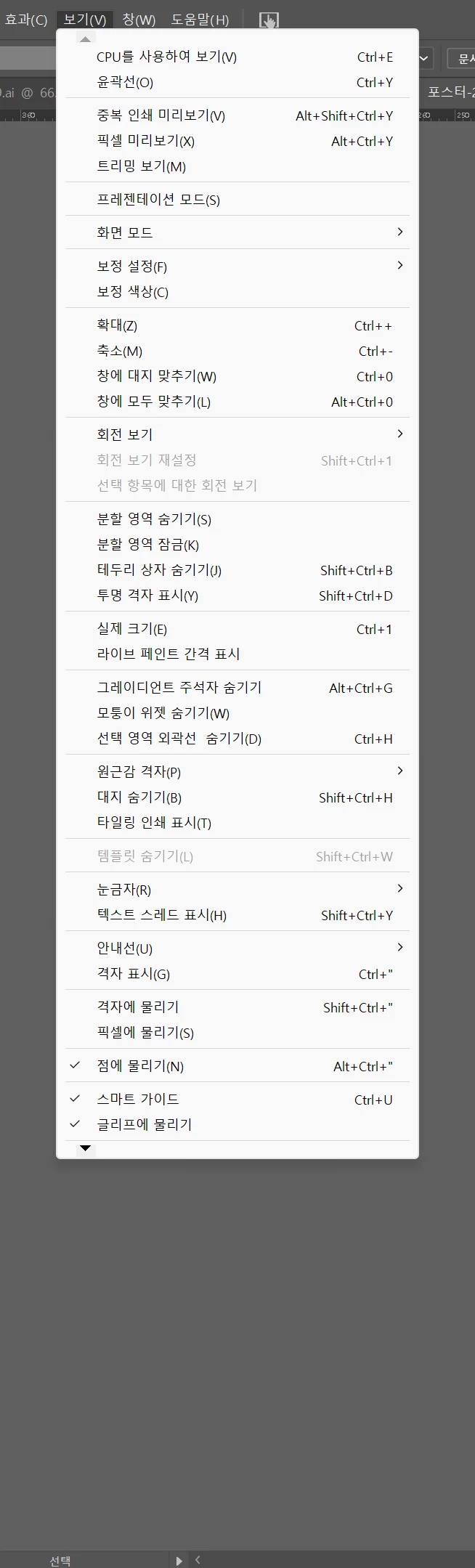
 

그리고 문자 메뉴에서 글꼴의 하위 메뉴 표시는 유독 배율 적용이 되지 않고 작게 표시됩니다.

 

디스플레이 설정을 100% 배율로 바꾸면 해결되지만 글자가 너무 작아지고, 윈도우 설정을 바꾸지 않고 일러스트레이터의 설정만 바꾸자니 아래 스크린샷 처럼 메뉴 표시 크기가 엉망이 됩니다.
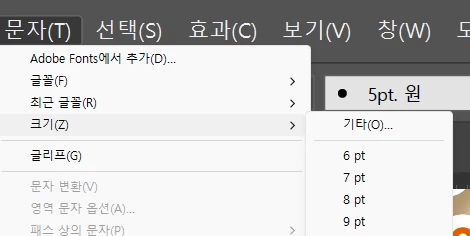
 

윈도우 설정과의 호환성 개선이 필요해 보입니다.


적어도 저 속터지는 삼각형 아이콘을 클릭해야만 스크롤 되는 답답한 UI가 개선되길 바랍니다.

    4 replies

    creative explorer
    Community Expert
    Community Expert
    September 1, 2026

    @LeeSeok do you see the black arrow on the bottom, you need to click on that to expand more:


    With regards to your display settings...this happens to me when I am at work. In my office, I have two screens, but when I log into a different workstation there is only one screen, one of the apps is far off. I would change the resolution to a smaller such as 1280 or 960, so I can resize the app correctly and then move in back onto one screen. Once I am good, I resize the application frame to it’s full screen to the monitor. May try that

    m
    LeeSeok
    LeeSeokAuthor
    Inspiring
    September 7, 2026

    답변 감사합니다.
    하지만 언급된 삼각형 아이콘 UI를 모르기 때문에 작성한 질문이 아닙니다.

    화면 배율에 따라 메뉴가 다 표시되지 못하고 잘리는 것이 해결될 수 없는 문제라면 적어도 지금의 답답한 UI대신 언제라도 마우스 휠로 자유롭게 스크롤할 수 있기를 바랍니다.

    Harshika Verma
    Community Manager
    Community Manager
    September 18, 2026

    Hi LeeSeokLee Seok,


    Thank you for reaching out and sorry to hear you're having trouble with the UI in Illustrartor. Would you mind telling us if you're experiencing the issue with the current version of Illustrator (30.8.1)? Are you connected to any external monitor?


    Please let us know and we will be happy to investigate this further with the team.


    Thanks,

    Harshika