Piter1288
Inspiring
March 20, 2023
Answered

2 questions about alignment

  • March 20, 2023
  • 2 replies
  • 1293 views

I wonder if the following can be done natively or via some extension.


1) Align paths to shapes optically so they will look centered (optical text does not work for this purpose)


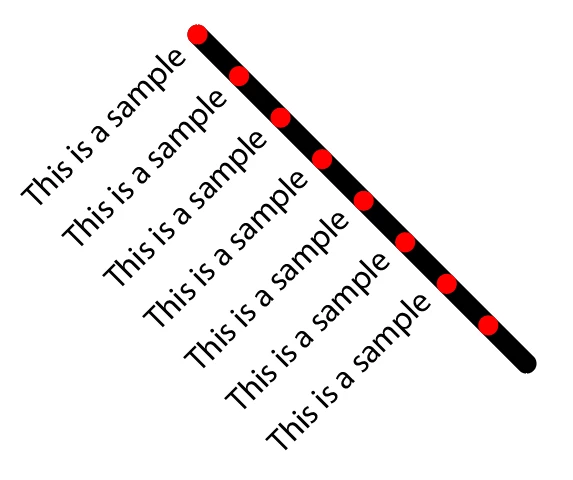
2) Align rotated items. For example each text to each corresponding red dot:
 

This topic has been closed for replies.
Correct answer Monika Gause

You know you can align to glyph bounds, right?

https://helpx.adobe.com/illustrator/using/align-text.html

(it pays off to read the new features every now and then)


But still this might not fit optically and there's just no way for software to optically align things correctly.

2 replies

Community Expert
March 20, 2023

If you turn on the option "Align to Glyph Bounds" in the Character palette you can vertically center-align the letters of a point type object with another object. It usually works best if you type out a "dummy" squared letter like a capital "E", align that letter to the target object and then type your desired text over the dummy "E" letter."

This sort of thing would be faster/easier if Illustrator had an alignment options to align/distribute type objects according to their baselines. My understanding is the Illustrator development team is working on such a feature. CorelDRAW has had the ability to align and distribute type objects by baseline for many years.

As for aligning type objects to other objects that have been rotated to some kind of angle, I don't think any vector graphics program does that. Astute Graphics' ColliderScribe plugin for Illustrator has some pretty interesting object placement effects. But I don't think it does what you're asking.

Piter1288
Piter1288Author
Inspiring
April 5, 2023

I align things by copying and pasting the X and Y position so maybe Illustrator can create a workaround based on that. With text I guess they would have to find a way to get those numbers cause each letter gets its own when the text is outlined, otherwise the position is from the box.

Jacob Bugge
Community Expert
Community Expert
March 20, 2023

Piter,


1): You/the viewer can do it natively: what looks right is right.


2): You can set the Leading to be identical to the distance between the red dots, and then simply align one of the lines of type to the corresponding red dot as desired by baseline (maybe to bottom of dot) or x height (maybe to centre of dot) or whatever, or just so it looks right.


Piter1288
Piter1288Author
Inspiring
March 20, 2023

Hi Jacob,


I know I can move a path, but one day I'm like "oh that looks perfect" and the next "wow that looks way far to the right" so maybe ai could figure it depending on the background shape.


For number 2, I do have a way to align it perfectly, but it requires to outline the text and I'd wish to leave the text editable. Text boxes do not align correctly as the center depends of the last and first letter depending if it's located at the right or the left of the circle:


Met1
Legend
March 20, 2023

"one day I'm like "oh that looks perfect" and the next "wow that looks way far to the right""

I don't think there's a function for Illy to know what day of the week it is, but it's certainly programmable... but not your mood...


"requires to outline the text"

Yep, I do this daily - copy, outline, align, paste, match up, cut, delete outline, past in place... live text...