
clover89552617
Participant
March 9, 2018
Answered

2018 Illustrator asking to disable plug-ins I wasn't given.

  • March 9, 2018
  • 3 replies
  • 909 views

Hi folks,

I have El Capitain. Just installed CC 2018 and tried to open Illustrator - it wouldn't open. Force quit. Reopen and it's in safe mode with this:
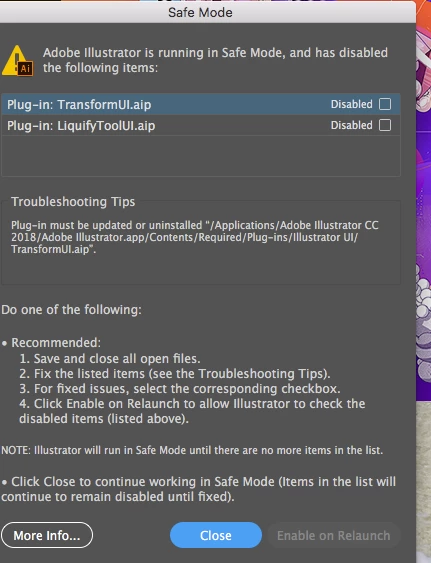
Issue here is those plugins are nowhere to be found in the folder with the app, or anywhere.

There is no "contents" folder either.

Suggestions?

This topic has been closed for replies.
Correct answer Test Screen Name

There's always a Contents folder, inside EVERY Mac app. You can right click and use View Package Contents to see it.

3 replies

Test Screen NameCorrect answer
Legend
March 9, 2018

There's always a Contents folder, inside EVERY Mac app. You can right click and use View Package Contents to see it.

clover89552617
Participant
March 11, 2018

@ Test Screen Name

that was a million dollar bit of advice there

tks for your help!

Monika Gause
Community Expert
Community Expert
March 9, 2018

Looks like installation failed.

You could try if restarting the computer helps.

Also if resetting the preferences helps.

How to set preferences in Illustrator

If that fails, you might need to reinstall.

Run the Adobe Cleaner tool after uninstallng.

Use the Creative Cloud Cleaner Tool to solve installation problems

clover89552617
Participant
March 11, 2018

Thanks Monika -

Still in Safe Mode after restart.

It's a new install - so the preferences are default.

I was afraid I'd need to reinstall - sounds likely.

Kanikas
Legend
March 9, 2018

Moving to Illustrator

clover89552617
Participant
March 11, 2018

thanks - I searched these and couldn't find help. but there's a lot to sift through.

this isn't an Adobe update but a new install.