
Participant
January 25, 2018
Answered

3D cylinder inside another 3D cylinder

  • January 25, 2018
  • 2 replies
  • 2108 views

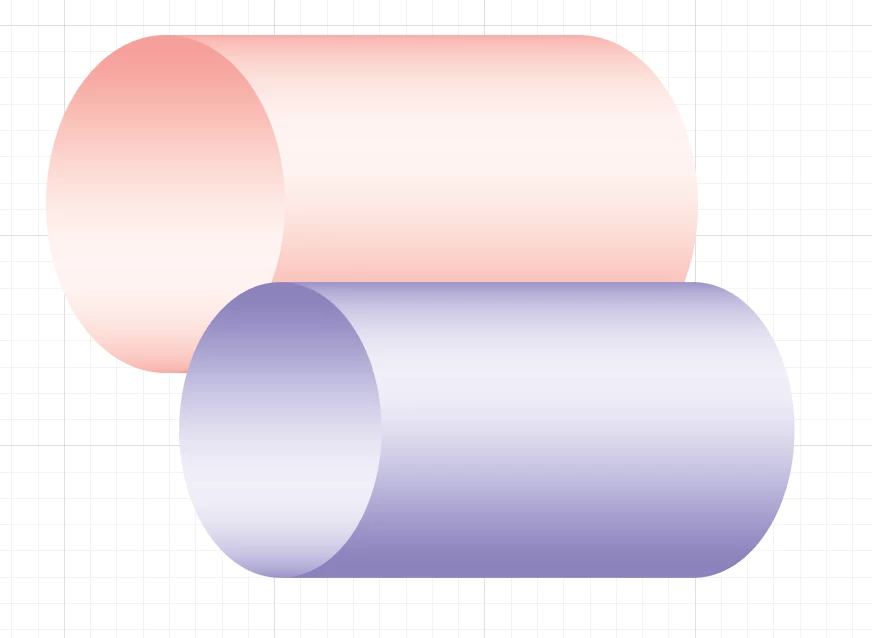
Hello, I'm trying to make an illustration where there is a 3D cylinder inside another 3D cylinder but I can't find any tutorials on how to do it, does anyone have any ideas? I want to put the purple cylinder inside the red one.
This topic has been closed for replies.
Correct answer Doug A Roberts

in that case create two concentric circles, group them, then use Effects > 3D > Extrude & Bevel

i thought yours were drawn objects with gradients because the 3D effect won't look much like your example image.

2 replies

Ton Frederiks
Community Expert
Community Expert
January 25, 2018

I would use 2 lines, one shorter than the other. Group them and use the 3D Revolve Effect:

Doug A Roberts
Community Expert
Community Expert
January 25, 2018

i guess these are drawn objects, something like this?

group the smaller cylinder. place it where you want it. copy and paste in front (ctrl + F) the ellipse from the larger cylinder. select it and the smaller cylinder and use Object > Clipping Mask > Make (ctrl + 7)

Participant
January 25, 2018

Hi Doug, you're a star, that's exactly what I want, however when I do it, it doesn't work or look like that, is there any chance you could give me a step by step instruction, your help would be most appreciated My objects aren't drawn but I've made the objects via the 3D effects opition on the eclispe shape tool.

Doug A Roberts
Community Expert
Doug A RobertsCommunity ExpertCorrect answer
Community Expert
January 25, 2018

in that case create two concentric circles, group them, then use Effects > 3D > Extrude & Bevel

i thought yours were drawn objects with gradients because the 3D effect won't look much like your example image.