
Participant
September 26, 2022
Answered

3D extrusion with unexpected stroke

  • September 26, 2022
  • 2 replies
  • 488 views

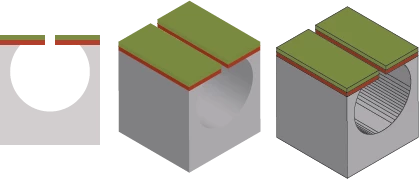
Hi all, I am trying to draw some pictures in 2D and extrude them into 3D view, then add strokes with 'Expand Appearance', but some unexpected lines appear here (inside the hollow structure) and I have no idea how to avoid.
 

This topic has been closed for replies.
Correct answer Monika Gause

You can't completely avoid the, but you can improve the result with different 3D settings: https://www.youtube.com/watch?v=RAhLj5G8eGU

2 replies

Monika Gause
Community Expert
Monika GauseCommunity ExpertCorrect answer
Community Expert
September 26, 2022

You can't completely avoid the, but you can improve the result with different 3D settings: https://www.youtube.com/watch?v=RAhLj5G8eGU

Ton Frederiks
Community Expert
Community Expert
September 26, 2022

Looks like you added a stroke after expanding. The "gradient" inside the hollow structure is not a real gradient, but a series of shapes that simulate a gradient, these shapes get a stroke too.

QihuiAuthor
Participant
September 26, 2022

Hi Ton, thanks for your comment! Yes, I added a stroke after expanding. If I add it before expanding, the stroke will be extruded as well. Do you have any ideas how to avoid or eliminate those lines?