Participant
July 16, 2023
Question

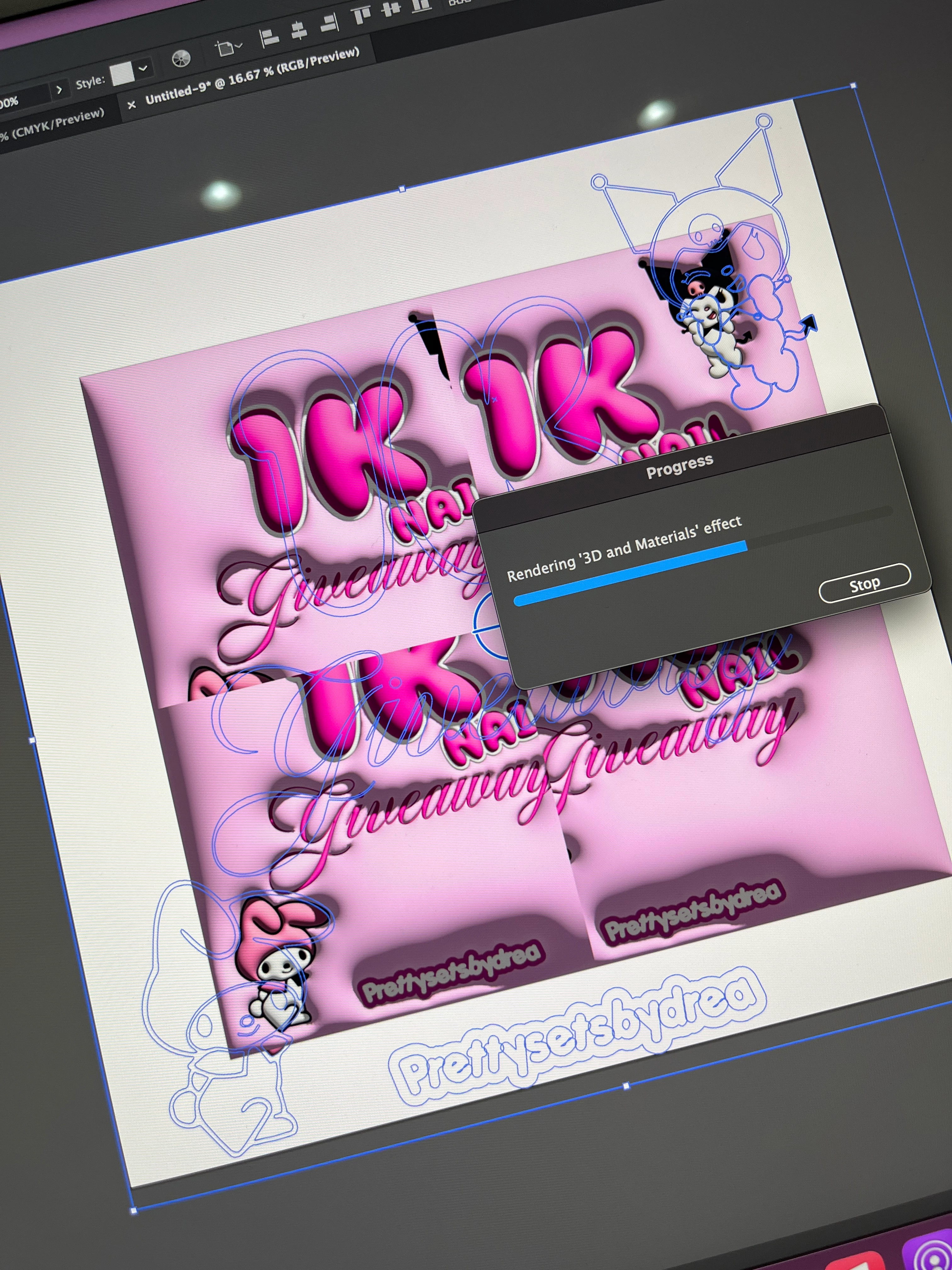
3D Scale breaks object in 4 parts

  • July 16, 2023
  • 3 replies
  • 399 views

Does anyone know how to fix this issue with the 3D inflate tool? when I group the objects and apply the 3D effect it gives me 4x the artwork 
This topic has been closed for replies.

3 replies

Anshul_Saini
Community Manager
Community Manager
July 27, 2023

Hi @Brooke30761847q4g4,


I understand the frustration you're facing with the 3D inflate tool breaking your artwork into four parts. As Monika mentioned, it's a known limitation where the 3D artwork breaks into four parts after reaching a certain size. To better assist you, could you please confirm the size of the object you inflated? This information will be helpful in finding a suitable workaround for your design needs. Thank you for reaching out!


Thanks,
Anshul Saini

Monika Gause
Community Expert
Community Expert
July 16, 2023

This is an issue in at least some versions that appears when the objects is larger than a certain size. Are you already using the newest version?

Participant
July 16, 2023

No I and not, but I am updating the program to v 27.7. 

barbara_a7746676
Community Expert
Community Expert
July 16, 2023

I'm not able to replicate the issue. Is it possible that you have more than one copy of the artwork to begin with, before applying the filter?

Participant
July 16, 2023

No I don't have multiple copies of anything. Just a square for the background, outlined text with added offset paths and inserted SVGs of characters. Could it be a memory issue? 

barbara_a7746676
Community Expert
Community Expert
July 16, 2023

I doubt it is a memory issue. The file might be corrupt. Try a new file with simpler grouped shapes and see if you get the same result.
