Known Participant
May 10, 2019
Answered

A question about PDF Output settings

  • May 10, 2019
  • 2 replies
  • 1011 views

Hello!

Can someone explain what PDF Output options do and how they work in Illustrator?

I already checked out adobe's guide, but could not understand it since it seemed a bit too complicated.

This topic has been closed for replies.
Correct answer jdanek

"Can someone explain what PDF Output options do and how they work in Illustrator?"

PDF settings have nothing to do with Illustrator other than they should honor your Illustrator Color Settings, Raster effects resolution, and fonts.  A PDF is a file type suitable for output ( in the case of print shops, that would be their RIP / Platemaker ). PDF stands for ( if I am not mistaken ) portable document format.  I have captured my Adobe Distiller "Press Quality" PDF Settings...
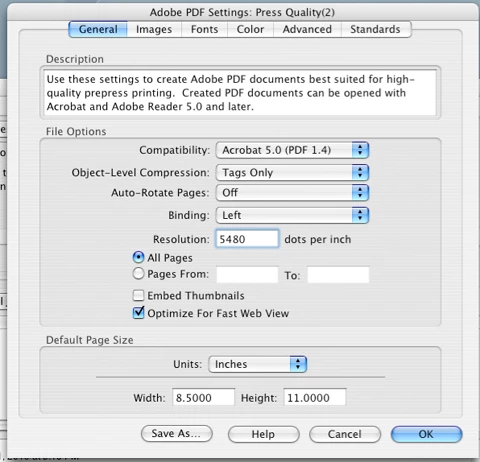
notice the "Resolution" is set for 5480 DPi.  I use these settings on all print jobs and never ran into any problems...
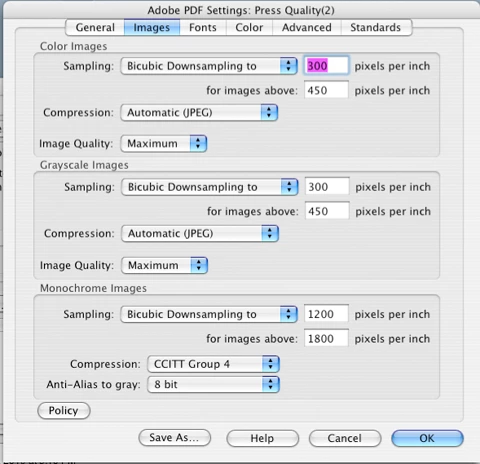
actually my "Monochrome Image Sampling is a little low, but still within reason.  I hould set it for 2740 DPi...
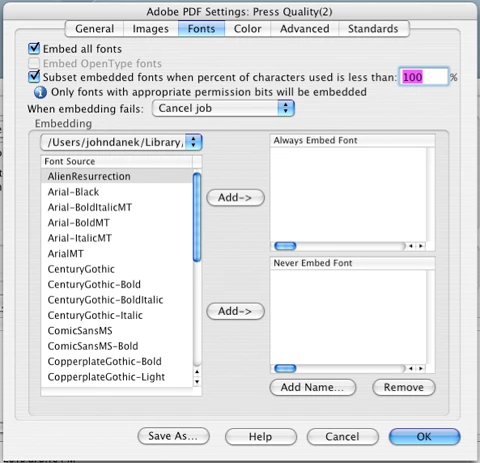
and your fonts should be embedded ( above )...
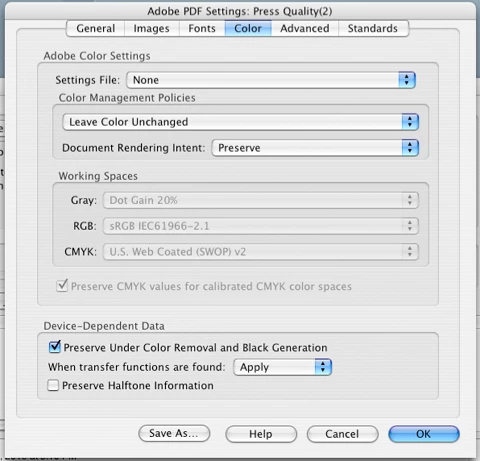
this is probably the most important setting ( for spot color especially ) "Leave Color Unchanged", mainly because you've already established your color swatches in Illustrator and you want them honored with no further manipulations...
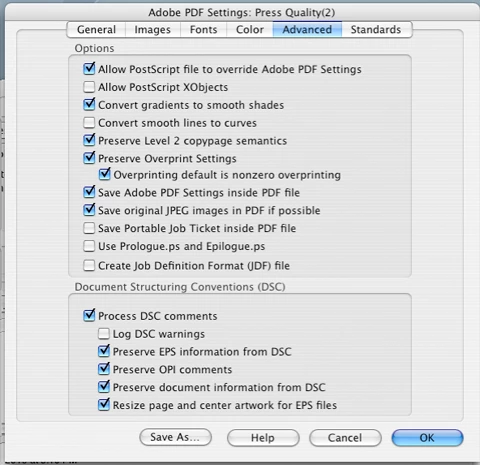
and these ( above ) are user specific, but your print vendor may want some of these settings and may not want others...
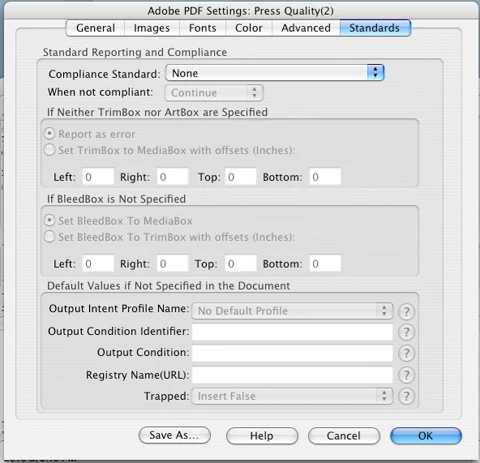
last, but not least, Standards > None, again, your print vendor may want to chime in here, but by leaving it set to "none", you are leaving it open because, after all, you are in an open loop workflow ( when you send files out to be printed ).

These are my Distiller settings, but they should give you a better understanding of what to use in your given scenario.  One recommendation I make to new users or persons not that familiar with printing is to get Adobe's Print Publishing Guide, a very useful book about file prep and printing.

2 replies

jdanekCorrect answer
Inspiring
May 11, 2019

"Can someone explain what PDF Output options do and how they work in Illustrator?"

PDF settings have nothing to do with Illustrator other than they should honor your Illustrator Color Settings, Raster effects resolution, and fonts.  A PDF is a file type suitable for output ( in the case of print shops, that would be their RIP / Platemaker ). PDF stands for ( if I am not mistaken ) portable document format.  I have captured my Adobe Distiller "Press Quality" PDF Settings...

notice the "Resolution" is set for 5480 DPi.  I use these settings on all print jobs and never ran into any problems...

actually my "Monochrome Image Sampling is a little low, but still within reason.  I hould set it for 2740 DPi...

and your fonts should be embedded ( above )...

this is probably the most important setting ( for spot color especially ) "Leave Color Unchanged", mainly because you've already established your color swatches in Illustrator and you want them honored with no further manipulations...

and these ( above ) are user specific, but your print vendor may want some of these settings and may not want others...

last, but not least, Standards > None, again, your print vendor may want to chime in here, but by leaving it set to "none", you are leaving it open because, after all, you are in an open loop workflow ( when you send files out to be printed ).

These are my Distiller settings, but they should give you a better understanding of what to use in your given scenario.  One recommendation I make to new users or persons not that familiar with printing is to get Adobe's Print Publishing Guide, a very useful book about file prep and printing.

Known Participant
May 11, 2019

Thank you so much for your time!

Your screenshots will be really useful.

Monika Gause
Community Expert
Community Expert
May 10, 2019

We can't just repeat what's in the documentation. So you might want to tell us specifically what you don't understand.

Known Participant
May 10, 2019

Pretty much the whole section about the output settings. Destination, color conversion, etc.

I also really appreciate the link you sent me in my other post, so if you can share any good resources related to the most important things related to printing that would be really beneficial, as I just can't seem to find any courses that I trust. Any printing book recommendations would also be very useful.

Monika Gause
Community Expert
Community Expert
May 10, 2019

Any chance you can read German?

In that case this free PDF would tell you all: https://www.cleverprinting.de/cleverprinting-handbuch-kostenlos-herunterladen/

On LinkedIn you could check out the courses by Claudia McCue, who is a renowned expert in all things print. Basically what you find concerning InDesign applies to Illustrator as well.