
Inspiring
March 12, 2018
Answered

A5 borderless printing in Illustrator?

  • March 12, 2018
  • 1 reply
  • 6868 views

Hey,

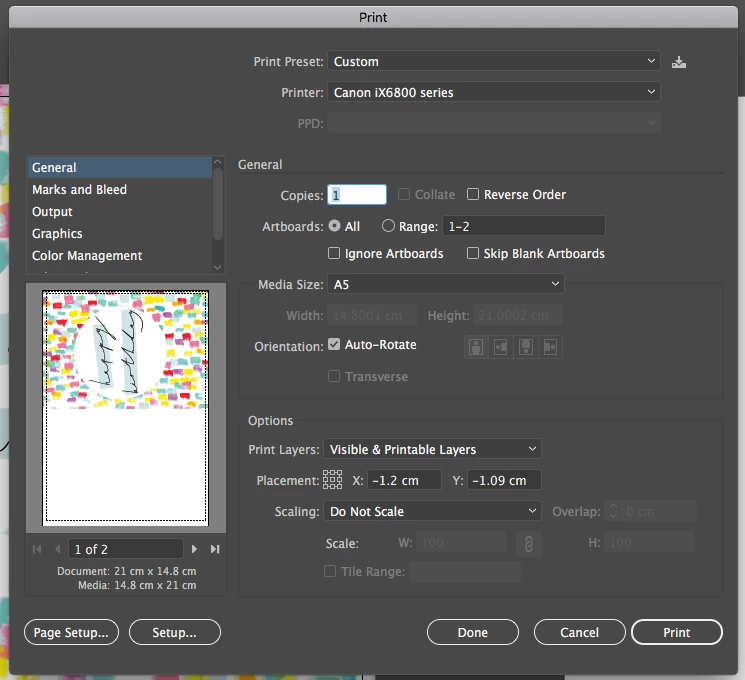
I'm currently using the CC suite and trying to print from illustrator. The problem that I'm having is that when printing A5 or even selecting my own paper size it still creates a boarder and I don't want it. At first I thought it was due to the printer and the setting but I recently bought another printer  (different brand) and the format hasn't changed therefore concluded it must be an illustrator thing. I would be very grateful if anyone could give me some advice on how to get rid off the border issue.

Thanks in advance,

Penny
    This topic has been closed for replies.
    Correct answer Monika Gause

    The printer needs to support it. It's a hardware thing.

    1 reply

    Monika Gause
    Community Expert
    Community Expert
    March 12, 2018

    Does the printer print borderless?

    Most don't.

    Inspiring
    March 12, 2018

    Hi Monika,

    There is a borderless option for A4 & A3 but not other sizes.

    I take it, it is the printer options not an illustrator issue?  As I can't change the amount of extension as it's greyed out.

    Is there any other way round it?

    Thanks,

    Penny

    Monika Gause
    Community Expert
    Monika GauseCommunity ExpertCorrect answer
    Community Expert
    March 12, 2018

    The printer needs to support it. It's a hardware thing.