
karthickm50893796
Inspiring
November 2, 2016
Question

Abobe illustrator to Postscript (save)

  • November 2, 2016
  • 4 replies
  • 3924 views

Hi Every one,

Can Anyone help me to done this

Actually Iwant to save a illustrator file to postscript file. i have tried with below script but i cant get Output

set filepath to "DistillerIHT:In:" as Unicode text

tell application "Finder"

   --set cName to theC as string
end tell

tell application "Illustrator CS"

   activate

   --set thisDoc to current document
   set user interaction level to never interact

   set thisDoc to name of current document as text

   set FullPath to filepath & thisDoc & ".ps"

   --display dialog newFPath -- this was just to check the path
   set ppdFileName to "Adobe PDF" as Unicode text

   set postOpts to {class:postscript options, PostScript:level 2}


   set jobOpts to {class:job options, print area:artboard bounds, print as bitmap:true, file path:FullPath}


   set printOpts to {class:print options, job settings:jobOpts, postscript settings:postOpts, printer name:"Adobe Postscript® File", PPD name:ppdFileName}


   print current document options printOpts without dialogs

end tell

My Error
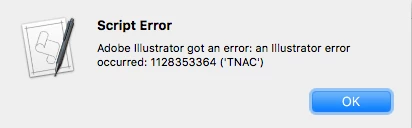
Thanks,

Karthick

This topic has been closed for replies.

4 replies

Inspiring
November 3, 2016

Hi

I found most of this script here, changed a few things to suit your setup, I to get the same error, but managed to create a .ps file,

I had to run the script three times though to get the .ps file, first run produced TNAC error, second run produced a 300 error, then

on the third run a .ps file, really strange.

I always prefer to run a preset makes life easier, plus you could have a few presets and have a list thrown up to choose which one

you want to use.

So unless there's a fix for this, I can only suggest a different style of scripting or try calling a preset.

MacScripter / Adobe Illustrator CS (v 11.0.0) printing postscript via applescript

set cName to "DistillerIHT:In:"

tell application "Adobe Illustrator"

    activate

    set thisDoc to current document

    set user interaction level to never interact

    set newF to name of current document

    set newFPath to cName & newF & ".ps"

    set ppdFileName to "Adobe PDF" as Unicode text

    set postOpts to {class:postscript options, PostScript:level 2}

    set jobOpts to {class:job options, print area:artboard bounds, print as bitmap:true, file path:newFPath}

    set printOpts to {class:print options, job settings:jobOpts, postscript settings:postOpts, printer name:"Adobe Postscript® File", PPD name:ppdFileName}

    print document 1 options printOpts --without dialogs

    set user interaction level to interact with all

    close thisDoc saving no

end tell

karthickm50893796
Inspiring
November 7, 2016

Hi Kevin Parrott

Thanks for your detailed information,

i am still getting TNAC error for all scripts including yours script,  but you talk about presets can u draft a script with using presets to save postscript file may be thats useful.

even through i found another way online see below link...

https://acrobatusers.com/forum/printing-prepress/automation-convert-pdf-ps/

Thanks

Karthick | Eagerly waiting for your response

karthickm50893796
Inspiring
November 2, 2016

Final file will be

karthickm50893796
Inspiring
November 2, 2016

Inspiring
November 2, 2016

What if you do it manually ? Same error ?