
Inspiring
July 12, 2023
Answered

Access Opentype Features by scripting
  • July 12, 2023
  • 2 replies
  • 603 views


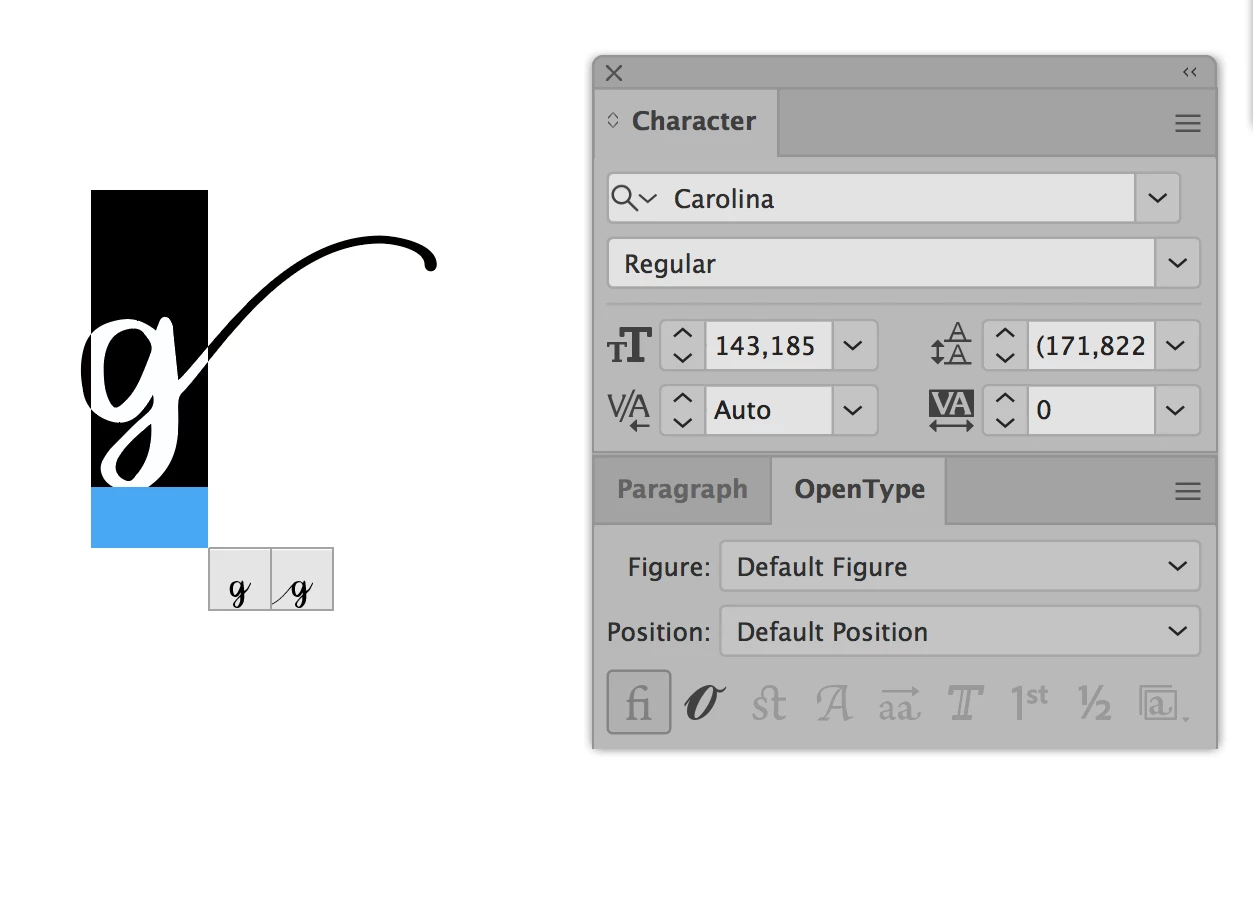
whilst UI displays contextual menu when selecting character, values in code
 
ligature:
false
discretionaryLigature:
false
contextualLigature:
false
fractions:
false
ordinals:
false
swash:
false
titling:
false
connectionForms:
false
stylisticAlternates:
false
ornaments:
false
 
does not to seem to do anything, sadly, in either 
 
tactiveDocument.textFrames[0].textRange.characters[0].characterAttributes
tactiveDocument.textFrames[0].textRange.characterAttributes
 
what I could be missing?

@m1b

maybe you have insights?

This topic has been closed for replies.
Correct answer dolce5EC2

I found a solution for this particular case.

you have to set both 

.characterAttributes.connectionForms = true;
and
.characterAttributes.contextualLigature = true;
for ligature to appear, strangelly when set from context mini menu in illustrator UI
these value do not seem to change in code. 
 

2 replies

m1b
Community Expert
Community Expert
July 12, 2023

My (limited) understanding is that the two alternative glyphs shown in your screen shot are derived directly from the font's opentype features, so that by turning the various available opentype features (ie. the ones that you mentioned in your post) on or off you will be able to find one or the other. For example:

item.textRange.characterAttributes.stylisticAlternates = true;


If that doesn't work for some reason, another avenue to try is to get the charCode of the character and see if that's significant. Usually it won't be because you are interested in the glyph which is mapped to the character, not the character itself, for example, my guess is that both "g" glyphs in your screen shot will have charCode 103. Anyway, you can test this:

$.writeln(item.textRange.contents.charCodeAt(0));

 This will show you the charCode of the first character of the text.


Can you try the various opentype features first and see if any work? If you get stuck you might need to share the sample document and font (if appropriate).

- Mark

dolce5EC2Author
Inspiring
July 12, 2023

thanks for your reply, Mark


at the end I had managed to get swoosh to show by setting both connectionForms and contextualLigature

to true. Strange still, settings from the UI context menu does not seem to change these values in js, I tried to trace them out to "false", so much poking and experimenting was involved.


There is no document involved, just a weird font https://allbestfonts.com/carolina/


m1b
Community Expert
Community Expert
July 13, 2023

Hi @dolce5EC2, glad you got it working.

quote

thanks for your reply, Mark


at the end I had managed to get swoosh to show by setting both connectionForms and contextualLigature

to true.

There is nothing strange here. It is exactly what I suggested.


Strange still, settings from the UI context menu does not seem to change these values in js, I tried to trace them out to "false", so much poking and experimenting was involved.

This might be because those properties will return false if your text contains multiple values. To properly test, you need to target, say, an individual character of the text, not the whole text. Just an idea. In my testing it worked as I expected.

- Mark

dolce5EC2AuthorCorrect answer
Inspiring
July 12, 2023

I found a solution for this particular case.

you have to set both 

.characterAttributes.connectionForms = true;
and
.characterAttributes.contextualLigature = true;
for ligature to appear, strangelly when set from context mini menu in illustrator UI
these value do not seem to change in code.