

Bria5EB3
Known Participant
February 14, 2021
Answered

Action or Script to Create sets of Boxes Automatically

  • February 14, 2021
  • 3 replies
  • 2729 views

Hi everyone,

I have just joined this Adobe Community Forum on the advice of someone I know who has told me about Actions and Scripts. They said this place is very helpful and a wealth of knowledge and I thought this would be the perfect place to get help with something I need streamlined.


I print on boxes in a pretty much non-for-profit that gives an alternative to plastic ecommerce cartons and such with recycled cartons pritned with environmentally sustainable and vegetable inks. When we print on these boxes Artists are required to mock them up to size on screen first then output to print once approved.


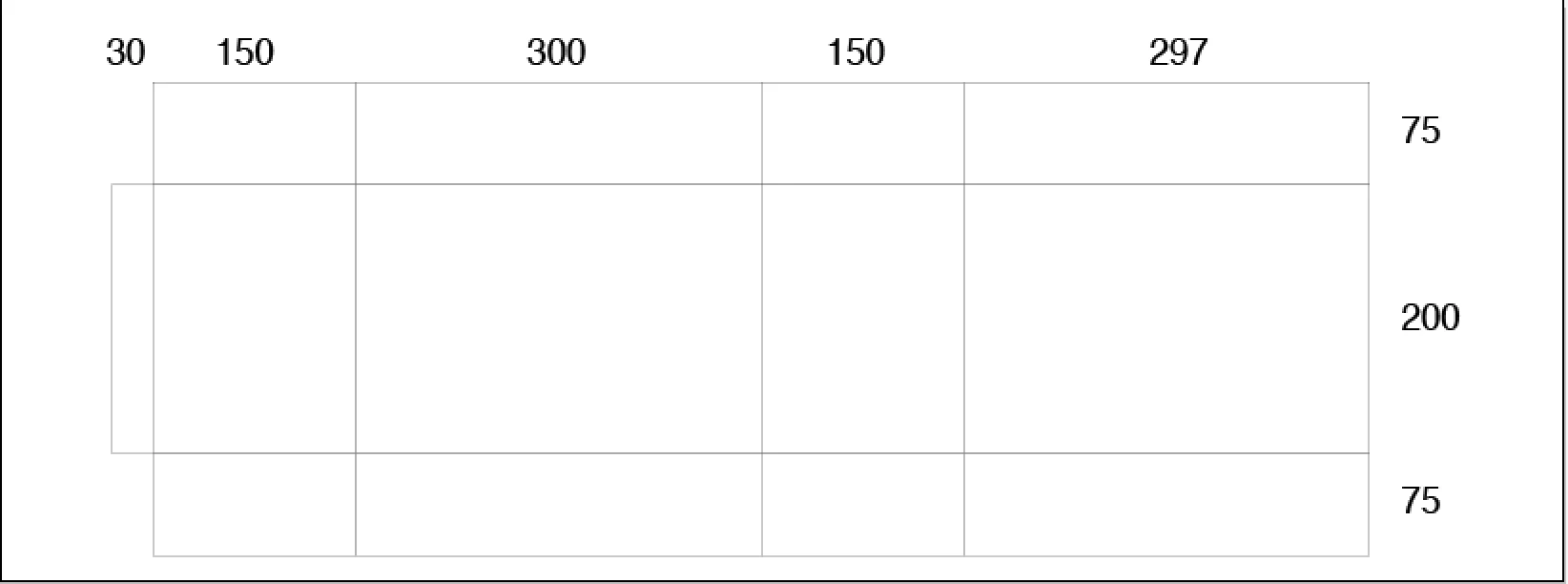
Below is a standard carton flat mockup ready for artwork to be applied. Right now the artists draw these boxes up manually. We're given sizing and scoring positions - one in the length and one in the width. In this case It's 30 150 300 150 297 in the Length direction and 75 200 75 in the width direction.


Drawing this up manually can take time and be tedious. I was wondering if there is a type of action or script that I could use that we could just copy and paste these two sets of numbers in and it generates our flat carton mockup as seen below. For everything we do these numbers are always almost differernt.


Thanks for any help!


Correct answer femkeblanco

Here it is in full:

var f = 2.83465;
var ws = prompt("Enter any number of widths (in mm) separated by spaces", "30 150 300 150 297", "Widths");
var hs = prompt("Enter any number of hights (in mm) separated by spaces", "75 200 75", "Hights");
var w = ws.split(" ");
for (var i = 0; i < w.length; i++){w[i] = Number(w[i])*f;}
var h = hs.split(" ");
for (var i = 0; i < h.length; i++){h[i] = Number(h[i])*f;}
var d = app.activeDocument.artboards[0].artboardRect;
var w1 = 0;
for (var i in w){w1 += w[i];}
var h1 = 0;
for (var i in h){h1 += h[i];}
var h2 = d[3]/2+h1/2;
for (var j = 0; j < h.length; j++) {
    var w2 = d[2]/2-w1/2;
    for (var i = 0; i < w.length; i++) {
        var rect0 = app.activeDocument.pathItems.rectangle(h2, w2, w[i], h[j]);
        rect0.name = "rect " + (j + 1) + ", " + (i + 1);
        w2 = w2 + w[i];
    }
    h2 = h2 - h[j];
}
// delete top and bottom left
app.activeDocument.pathItems["rect 1, 1"].remove();
app.activeDocument.pathItems["rect " + h.length + ", 1"].remove();

3 replies

femkeblanco
femkeblancoCorrect answer
Legend
February 20, 2021

Here it is in full:

var f = 2.83465;
var ws = prompt("Enter any number of widths (in mm) separated by spaces", "30 150 300 150 297", "Widths");
var hs = prompt("Enter any number of hights (in mm) separated by spaces", "75 200 75", "Hights");
var w = ws.split(" ");
for (var i = 0; i < w.length; i++){w[i] = Number(w[i])*f;}
var h = hs.split(" ");
for (var i = 0; i < h.length; i++){h[i] = Number(h[i])*f;}
var d = app.activeDocument.artboards[0].artboardRect;
var w1 = 0;
for (var i in w){w1 += w[i];}
var h1 = 0;
for (var i in h){h1 += h[i];}
var h2 = d[3]/2+h1/2;
for (var j = 0; j < h.length; j++) {
    var w2 = d[2]/2-w1/2;
    for (var i = 0; i < w.length; i++) {
        var rect0 = app.activeDocument.pathItems.rectangle(h2, w2, w[i], h[j]);
        rect0.name = "rect " + (j + 1) + ", " + (i + 1);
        w2 = w2 + w[i];
    }
    h2 = h2 - h[j];
}
// delete top and bottom left
app.activeDocument.pathItems["rect 1, 1"].remove();
app.activeDocument.pathItems["rect " + h.length + ", 1"].remove();
Participant
August 9, 2022

Thank you for the script dude you are amazing,

Is it possible to modify it that can match below photo

So I only have to input 3 dimensions (L,W,H)


Thank you in advance

femkeblanco
Legend
August 9, 2022
var f = 2.83465;
var IP1 = prompt("Enter L,W,H (in mm) separated by commas", "");
var IP2 = IP1.split(",");
var w = [IP2[0] * f, IP2[1] * f, IP2[0] * f, IP2[1] * f, 35 * f];
var h = [w[1] / 2, IP2[2] * f, w[1] / 2];
var d = app.activeDocument.artboards[0].artboardRect;
var w1 = ((w[0] + w[1]) * 2) + w[4];
var h1 = (h[0] * 2) + h[1];
var h2 = d[3] / 2 + h1 / 2;
for (var j = 0; j < 3; j++) {
    var w2 = d[2] / 2 - w1 / 2;
    for (var i = 0; i < 5; i++) {
        var rect = app.activeDocument.pathItems.rectangle(h2, w2, w[i], h[j]);
        rect.name = "rect " + (j + 1) + ", " + (i + 1);
        w2 = w2 + w[i];
    }
    h2 = h2 - h[j];
}
app.activeDocument.pathItems["rect 1, 5"].remove();
app.activeDocument.pathItems["rect 3, 5"].remove();
pixxxelschubser
Community Expert
Community Expert
February 20, 2021

Untested.


Try swapping the first few lines of code like this:

// var ws = "30 150 300 150 297";
// var hs = "75 200 75";
var f = 2.83465;
var ws = prompt("Enter any number of widths (in mm) separated by space", "30 150 300 150 297", "Widths");
var hs = prompt("Enter any number of hights (in mm) separated by space", "75 200 75", "Hights");
var w = ws.split(" ");


femkeblanco
Legend
February 14, 2021
// var w = [30, 150, 300, 150, 297];
// var h = [75, 200, 75];
var ws = prompt("Enter any number of widths separated by commas", "30, 150, 300, 150, 297", "Widths");
var hs = prompt("Enter any number of hights separated by commas", "75, 200, 75", "Hights");
var w = ws.split(",");
for (var i = 0; i < w.length; i++){w[i] = Number(w[i]);}
var h = hs.split(",");
for (var i = 0; i < h.length; i++){h[i] = Number(h[i]);}

var d = app.activeDocument.artboards[0].artboardRect;
var w1 = 0;
for (var i in w){w1 += w[i];}
var h1 = 0;
for (var i in h){h1 += h[i];}
var h2 = d[3]/2+h1/2;

for (var j = 0; j < h.length; j++) {
    var w2 = d[2]/2-w1/2;
    for (var i = 0; i < w.length; i++) {
        var rect0 = app.activeDocument.pathItems.rectangle(h2, w2, w[i], h[j]);
        rect0.name = "rect " + (j + 1) + ", " + (i + 1);
        w2 = w2 + w[i];
    }
    h2 = h2 - h[j];
}

// delete top and bottom left
app.activeDocument.pathItems["rect 1, 1"].remove();
app.activeDocument.pathItems["rect " + h.length + ", 1"].remove();


Bria5EB3
Bria5EB3Author
Known Participant
February 14, 2021

Thanks, I really appreciate this. I just tried it and it generates but is there anyway I can have the units generate in millimetres instead of pixels?

femkeblanco
Legend
February 14, 2021
// var ws = "30, 150, 300, 150, 297";
// var hs = "75, 200, 75";
var f = 2.83465;
var ws = prompt("Enter any number of widths (in mm) separated by commas", "30, 150, 300, 150, 297", "Widths");
var hs = prompt("Enter any number of hights (in mm) separated by commas", "75, 200, 75", "Hights");
var w = ws.split(",");
for (var i = 0; i < w.length; i++){w[i] = Number(w[i])*f;}
var h = hs.split(",");
for (var i = 0; i < h.length; i++){h[i] = Number(h[i])*f;}

var d = app.activeDocument.artboards[0].artboardRect;
var w1 = 0;
for (var i in w){w1 += w[i];}
var h1 = 0;
for (var i in h){h1 += h[i];}
var h2 = d[3]/2+h1/2;

for (var j = 0; j < h.length; j++) {
    var w2 = d[2]/2-w1/2;
    for (var i = 0; i < w.length; i++) {
        var rect0 = app.activeDocument.pathItems.rectangle(h2, w2, w[i], h[j]);
        rect0.name = "rect " + (j + 1) + ", " + (i + 1);
        w2 = w2 + w[i];
    }
    h2 = h2 - h[j];
}

// delete top and bottom left
app.activeDocument.pathItems["rect 1, 1"].remove();
app.activeDocument.pathItems["rect " + h.length + ", 1"].remove();