
Participating Frequently
January 22, 2019
Answered

Actions: How to insert stop for stroke width

  • January 22, 2019
  • 1 reply
  • 611 views

Hello,

I am doing an action to help my workflow.

I allready done action that I happy with but than I realize that I can not custumize this action.

What I am triyng to do it is to insert stop for stroke width. This parameter is very critical for the job and stroke width is diferent from object to object. I need to set up it manually. Is it is posible to do in illustrator?
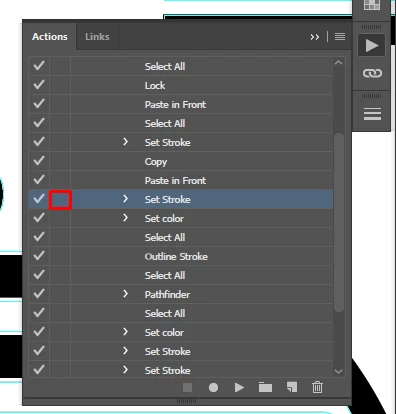
This topic has been closed for replies.
Correct answer Kurt Gold

There is a command in the flyout menu of the Actions palette. It is called "Insert Stop".

Is that what you are looking for?

1 reply

Kurt Gold
Community Expert
Kurt GoldCommunity ExpertCorrect answer
Community Expert
January 22, 2019

There is a command in the flyout menu of the Actions palette. It is called "Insert Stop".

Is that what you are looking for?

Participating Frequently
January 24, 2019

yes it works.

What I had in my mind it is pop-up window with stroke properties. Is it posible?

Kurt Gold
Community Expert
Community Expert
January 27, 2019

Well, somehow it is possible by opening the Strokes palette with the Insert Menu Item command in the Actions palette menu, but that is a "one-time-on" and "one-time-off" game.

A modal dialog to change stroke weights by absolute values does not exist.