Participating Frequently
May 8, 2017
Answered

Ad custom formats to existing Document Profiles

  • May 8, 2017
  • 3 replies
  • 962 views

Hello Everybody,

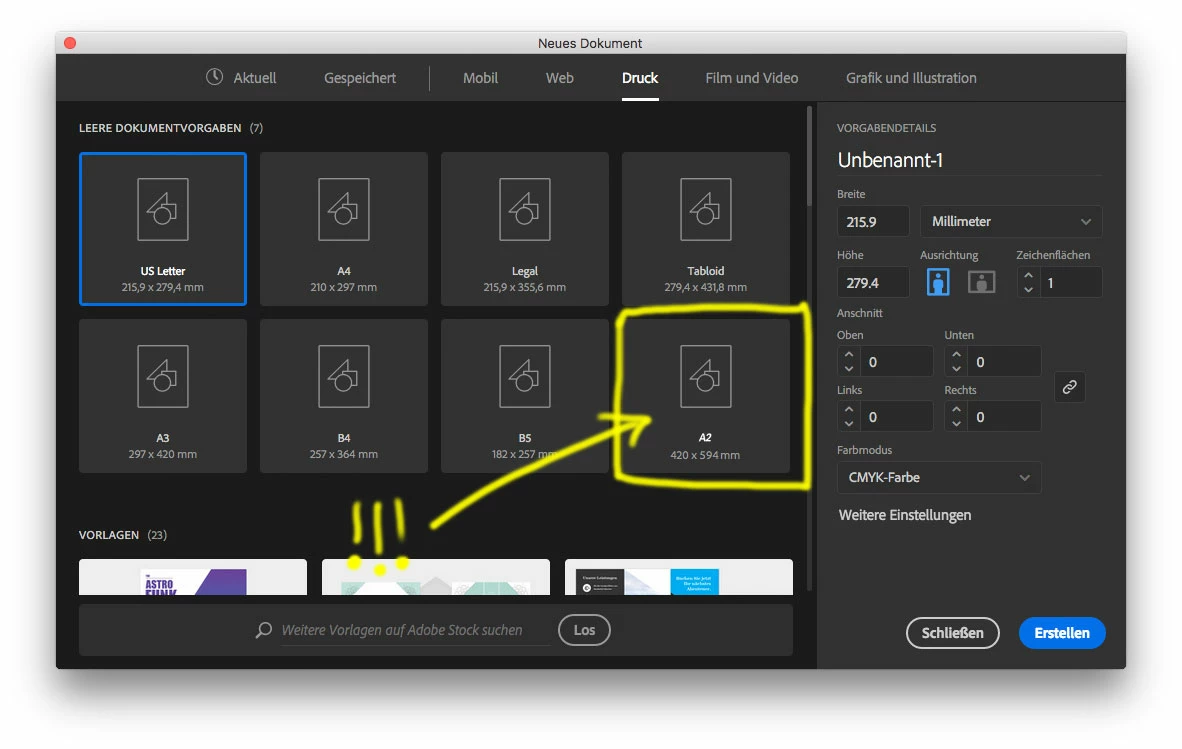
I would like to ad custom Document-Formats to the existing "Document Profiles".

Means when i Press "cmd+N" the standard Dialog shows up with the tabs: "Mobile, Web, Print etc…".

I would like to ad under "Print" my own Formats. I think it shouldn't be difficult but i can't get it done!

To show you a bit more accurate what i want to do please have a look at the pic i attached.

Many thanks in Advance!!
    This topic has been closed for replies.
    Correct answer Mike_Gondek10189183

    Hello Simon,

    With the "NEW" New Document interface you can only get cutom formats to show up under recent.

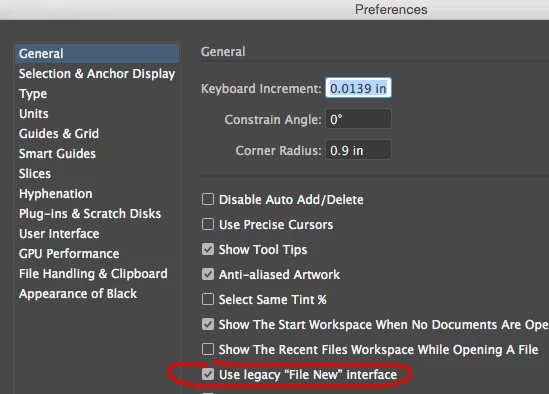
    You could go back to the previous "NEW" interface, which is faster and more reliable .

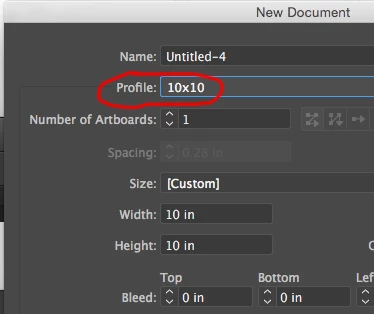
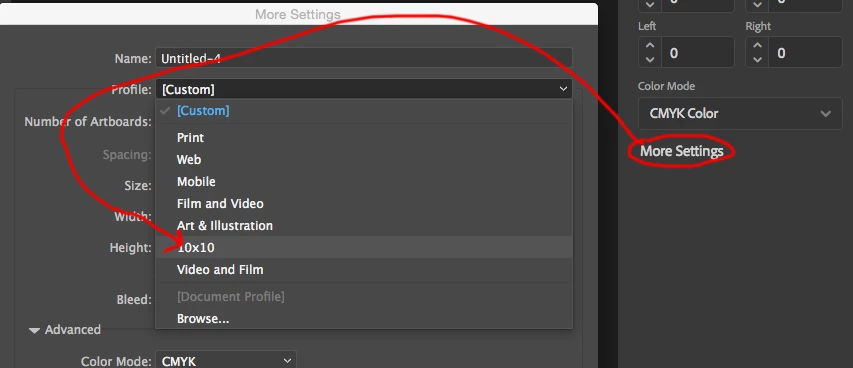
    Then add another file here \Users\YOURNAME\Library\Application Support\Adobe\Adobe Illustrator 21\en_US\New Document Profiles. The user library folder is hidden by the mac OS by default but you can hold down option and in the finder >> GO  >> Library

    Then you can close that profile here and will be permanetn and not depend upon recent.

    If you like the "NEW" new interface, then that will show up here.

    We did ask for your request during the prerelease Beta, but they have so  many people on the beta now  , and good requests form experienced users get buried. >.<

    3 replies

    Participating Frequently
    May 11, 2017

    Hey Guys!

    I wanted to thank you both and apologize for my language.

    I know you do a lot and i am thankful for your work.

    Sometimes you hit besides the target and that's annoying, so i get a bit grumpy.

    Anyway. I thank you in Advance Ohmnath to consider my demand for a next version of Illustrator.

    Best,

    Simon

    Om Nath Jha
    Legend
    May 11, 2017

    Hi Simon,

    No problem, I can completely understand your situation. Happy to help

    Regards,

    Om

    Mike_Gondek10189183
    Community Expert
    Mike_Gondek10189183Community ExpertCorrect answer
    Community Expert
    May 9, 2017

    Hello Simon,

    With the "NEW" New Document interface you can only get cutom formats to show up under recent.

    You could go back to the previous "NEW" interface, which is faster and more reliable .

    Then add another file here \Users\YOURNAME\Library\Application Support\Adobe\Adobe Illustrator 21\en_US\New Document Profiles. The user library folder is hidden by the mac OS by default but you can hold down option and in the finder >> GO  >> Library

    Then you can close that profile here and will be permanetn and not depend upon recent.

    If you like the "NEW" new interface, then that will show up here.

    We did ask for your request during the prerelease Beta, but they have so  many people on the beta now  , and good requests form experienced users get buried. >.<

    Participating Frequently
    May 9, 2017

    Hello Mike,

    thanks a lot for your answer.

    At least you could explain to me why i still will be frustrated.

    @adobe developer & Beta Team: PLEASE DO REAL USABILITY INSTEAD OF LOOKALIKE CRAP! This new "New" Window couldn't be worse!

    Best,

    Simon

    Om Nath Jha
    Legend
    May 9, 2017

    Hi Simon,

    You can do that by creating your own document profile/template. Please check this link: Creating new document Templates in CC2017

    Regards,

    Om

    Participating Frequently
    May 9, 2017

    Hey Ohmnath,

    No, this is not what i'm looking for.

    What you are telling i figured it out quite a while ago.

    I would just be able to add my own formats under "Print".

    This would be really logic for everyone.

    But the Adobe-Team tried to do it complicated when it could be sooo easy.

    Now you are forcing us to mess around with a ton of own "New Document Presets" instead of own Formats in the existing ones.

    I really don't understand you guys!

    Om Nath Jha
    Legend
    May 10, 2017

    Thanks for the feedback about the "File New" window. I'll share it with the concerned team. Thanks Mike for explaining the things in details. Really appreciated.

    Regards,

    Om