Inspiring
October 25, 2024
Answered

Add custom stroke weight on a permanent basis

  • October 25, 2024
  • 3 replies
  • 828 views
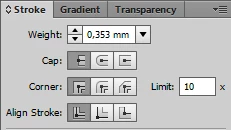
Is it possible to set a custom stroke weight value so that it is there every time you open the program?
p.s. well, at least it's there among the list of other values, but it's better if it's the default value


This topic has been closed for replies.
Correct answer Doug A Roberts

1. Open a new document with your preferred document profile (Film & Video, Art & Illustration, Web etc.).

2. Create an object and give it the stroke weight you want to use (and add/delete any other appearance attributes).

3. Open the Graphic Styles panel.

4. While holding alt, drag your object over 'Default Graphic Style' and drop (to replace it).

5. Save your file to C:\Users\Username\AppData\Roaming\Adobe\Adobe Illustrator 28 Settings\en_GB\x64\New Document Profiles

6. Use the new document profile you created for each new document, and it'll open with that default graphic style.

3 replies

Inspiring
October 25, 2024

@Ton Frederiks @Doug A Roberts While this solution works, is there no way to “edit” the thickness list to have this value for any open file, regardless of what profile it was created with?

Monika Gause
Community Expert
Community Expert
October 25, 2024

The long asnwer is no.

You can set up several graphic styles.

Doug A Roberts
Community Expert
Doug A RobertsCommunity ExpertCorrect answer
Community Expert
October 25, 2024

1. Open a new document with your preferred document profile (Film & Video, Art & Illustration, Web etc.).

2. Create an object and give it the stroke weight you want to use (and add/delete any other appearance attributes).

3. Open the Graphic Styles panel.

4. While holding alt, drag your object over 'Default Graphic Style' and drop (to replace it).

5. Save your file to C:\Users\Username\AppData\Roaming\Adobe\Adobe Illustrator 28 Settings\en_GB\x64\New Document Profiles

6. Use the new document profile you created for each new document, and it'll open with that default graphic style.

Ton Frederiks
Community Expert
Community Expert
October 25, 2024

Yes, you need to create a new or modify the New Document Profile that you use most often (like Print or Art & Illustration), select the default Graphic Style, change the Stroke Weight, create a new graphic style and Alt-Drag it over the Default one to update it. Save the file and restart Illustrator.

Next time you create a new document, base it on this modified profile.

You can find the profiles here:

https://helpx.adobe.com/illustrator/kb/create-custom-new-document-profile.html